Hi,
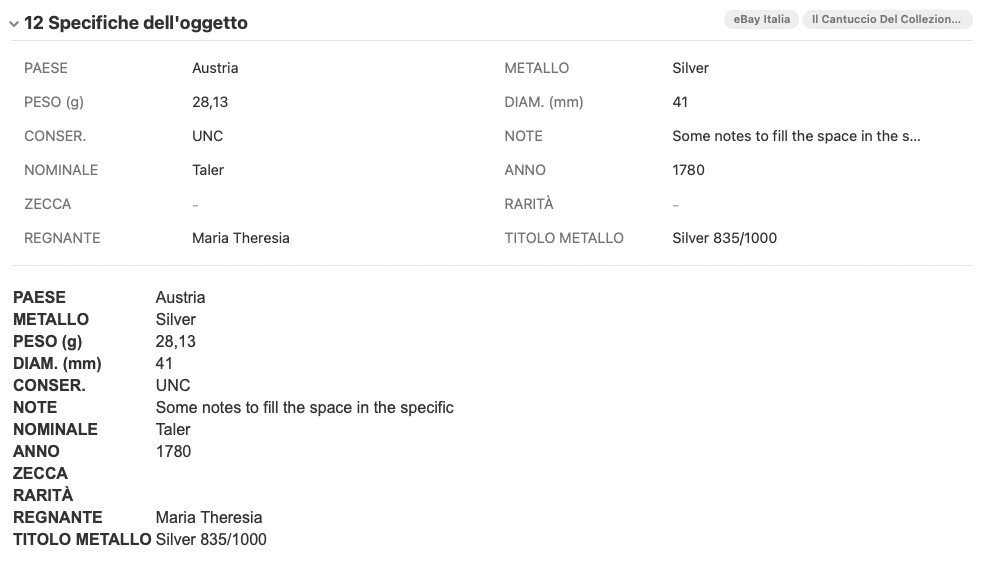
is there any trick to auto fill a listing’s title with item specifics? Let’s say I have 3 specifics (A, B and C) and the title is something like [[A]] + [[B]] + [[C]] . Is it something still possible to do?
Thanks for any help.
Federico
Hi,
is there any trick to auto fill a listing’s title with item specifics? Let’s say I have 3 specifics (A, B and C) and the title is something like [[A]] + [[B]] + [[C]] . Is it something still possible to do?
Thanks for any help.
Federico
That should be possible to do by using a script like this:
Hi Kristian,
glad to hear there is a solution, but I am afraid I am with no knowledge in the matter and I honestly have no idea what I should change. Let’s say title should be made of following attributes, in this exact order:
Than I will substitute myself the letters with the correct attribute name. How should I change the script? Also, if one or more of these attributes are empty, will the script put a “ “ (space) in the title or just ignore the empty field?
Thanks as always for your help.
This basic script should do the trick:
// Create title from given attributes
function run() {

	for (const listing of selectedListings) {
	// enter preceding text optionally:
	var precedingText = "";
	// enter name of attributes e.g. "Brand":
	var attributeA = "";
	var attributeB = "";
	var attributeC = "";
	var attributeD = "";
	var attributeE = "";
	var attributeF = "";
	var attributeG = "";
	var attributeH = "";
	var attributeI = "";

		if (precedingText) {
			precedingText = precedingText + " ";
		}
		if (listing.attributes[attributeA]) {
			attributeA = listing.attributes[attributeA] + " ";
		}
		if (listing.attributes[attributeB]) {
			attributeB = listing.attributes[attributeB] + " ";
		}
		if (listing.attributes[attributeC]) {
			attributeC = listing.attributes[attributeC] + " ";
		}
		if (listing.attributes[attributeD]) {
			attributeD = listing.attributes[attributeD] + " ";
		}
		if (listing.attributes[attributeE]) {
			attributeE = listing.attributes[attributeE] + " ";
		}
		if (listing.attributes[attributeF]) {
			attributeF = listing.attributes[attributeF] + " ";
		}
		if (listing.attributes[attributeG]) {
			attributeG = listing.attributes[attributeG] + " ";
		}
		if (listing.attributes[attributeH]) {
			attributeH = listing.attributes[attributeH] + " ";
		}
		if (listing.attributes[attributeI]) {
			attributeI = listing.attributes[attributeI] + " ";
		}

		listing.title = precedingText + attributeA + attributeB + attributeC + attributeD + attributeE + attributeF + attributeG + attributeH + attributeI;

	}
}
Open GarageSale’s script editor, click the “+” button to create a new script, and paste in the script above. Next adjust it by simply entering the name of the attributes you want to use, like this:
// enter name of attributes e.g. "Brand":
	var attributeA = "Brand";
	var attributeB = "Year";
	var attributeC = "Material";
You can ignore the rest of the script. You don’t have to use all of the attribute variables.
If done, just click the Run button. Check the title of the selected listing afterwards. (If in Preview mode you probably need to reload the listing.)
Hi @kristian ,
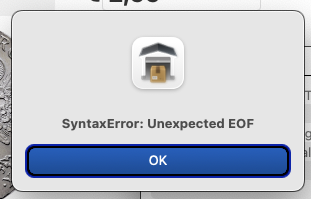
it says “SyntaxError: Unexpected EOF“. I followed instructions but maybe I am doing something wrong…
For me it works flawlessly. Can you post a screenshot of your code and the error maybe?
Maybe you didn’t copy and paste the entire code, so now part of it is missing?
Here is the script:
// Create title from given attributes
function run() {for (const listing of selectedListings) { // enter preceding text optionally: var precedingText = ""; // enter name of attributes e.g. “PAESE”: var attributeA = "PAESE"; var attributeB = "NOMINALE"; var attributeC = "ANNO"; var attributeD = "ZECCA”; var attributeE = "RARITÀ”; var attributeF = "METALLO”; var attributeG = "REGNANTE”; if (precedingText) { precedingText = precedingText + " "; } if (listing.attributes[attributeA]) { attributeA = listing.attributes[attributeA] + " "; } if (listing.attributes[attributeB]) { attributeB = listing.attributes[attributeB] + " "; } if (listing.attributes[attributeC]) { attributeC = listing.attributes[attributeC] + " "; } if (listing.attributes[attributeD]) { attributeD = listing.attributes[attributeD] + " "; } if (listing.attributes[attributeE]) { attributeE = listing.attributes[attributeE] + " "; } if (listing.attributes[attributeF]) { attributeF = listing.attributes[attributeF] + " "; } if (listing.attributes[attributeG]) { attributeG = listing.attributes[attributeG] + " "; } listing.title = precedingText + attributeA + attributeB + attributeC + attributeD + attributeE + attributeF + attributeG; }}
I guess the problem is “special” kind of quotes you entered:
var precedingText = "";
// enter name of attributes e.g. “PAESE”:
var attributeA = "PAESE";
var attributeB = "NOMINALE";
var attributeC = "ANNO";
var attributeD = "ZECCA”;
var attributeE = "RARITÀ”;
var attributeF = "METALLO”;
var attributeG = "REGNANTE”;
Instead of ” only use " !
I corrected your code:
var precedingText = "";
// enter name of attributes e.g. "PAESE":
var attributeA = "PAESE";
var attributeB = "NOMINALE";
var attributeC = "ANNO";
var attributeD = "ZECCA”;
var attributeE = "RARITÀ";
var attributeF = "METALLO";
var attributeG = "REGNANTE";
It works! I did not know there were different types of quotes… anyway, it works good but there is just a little problem. If the item specific is empty, the script puts a “space” in the title, so if you have one ore more empty attributes, there will be more spaces between words in title. Is is sometime that can be fixed?
Thanks again so much.
@fedege96 This modified script should work better for you if attributes exist but don’t have any values:
// Create title from given attributes
function run() {

	for (const listing of selectedListings) {
	// enter preceding text optionally:
	var precedingText = "";
	// enter name of attributes e.g. "Brand":
	var attributeA = "";
	var attributeB = "";
	var attributeC = "";
	var attributeD = "";
	var attributeE = "";
	var attributeF = "";
	var attributeG = "";
	var attributeH = "";
	var attributeI = "";

	// leave everything below untoched:
	var finalTitle = "";

		if (listing.attributes[attributeA] && listing.attributes[attributeA] !="") {
			finalTitle = finalTitle.concat(listing.attributes[attributeA]," ");
		}
		if (listing.attributes[attributeB] && listing.attributes[attributeB] !="") {
			finalTitle = finalTitle.concat(listing.attributes[attributeB]," ");
		}
		if (listing.attributes[attributeC] && listing.attributes[attributeC] !="") {
			finalTitle = finalTitle.concat(listing.attributes[attributeC]," ");
		}
		if (listing.attributes[attributeD] && listing.attributes[attributeD] !="") {
			finalTitle = finalTitle.concat(listing.attributes[attributeD]," ");
		}
		if (listing.attributes[attributeE] && listing.attributes[attributeE] !="") {
			finalTitle = finalTitle.concat(listing.attributes[attributeE]," ");
		}
		if (listing.attributes[attributeF] && listing.attributes[attributeF] !="") {
			finalTitle = finalTitle.concat(listing.attributes[attributeF]," ");
		}
		if (listing.attributes[attributeG] && listing.attributes[attributeG] !="") {
			finalTitle = finalTitle.concat(listing.attributes[attributeG]," ");
		}
		if (listing.attributes[attributeH] && listing.attributes[attributeH] !="") {
			finalTitle = finalTitle.concat(listing.attributes[attributeH]," ");
		}
		if (listing.attributes[attributeI] && listing.attributes[attributeI] !="") {
			finalTitle = finalTitle.concat(listing.attributes[attributeI]," ");
		}
		listing.title = precedingText + finalTitle;
	}
}
Sssssssuper Kristian! This is another debt of gratitude to you that I add to the long list I have!!
Can this work the other way around? Pick attributes from the title? Brass or copper, white porcelain, ect
This topic was automatically closed 10 days after the last reply. New replies are no longer allowed.