Is it possible to adjust tabs within text in the descriptive area?
Is it possible to place a table in the descriptive area?
Right now the only way to do this is by using your own HTML code.
Here’s a simple example of how to set up your HTML for tabs:
HTML:
<div class="tabs-container">
    <input type="radio" id="tab-1" name="my-tabs" checked>
    <label for="tab-1" class="tab-label">Tab 1</label>
    <div class="tab-content">Content for Tab 1</div>

    <input type="radio" id="tab-2" name="my-tabs">
    <label for="tab-2" class="tab-label">Tab 2</label>
    <div class="tab-content">Content for Tab 2</div>

    <input type="radio" id="tab-3" name="my-tabs">
    <label for="tab-3" class="tab-label">Tab 3</label>
    <div class="tab-content">Content for Tab 3</div>
</div>
CSS:
.tabs-container {
    display: flex;
    flex-direction: column;
}

.tab-content {
    display: none; /* Hide all tab content by default */
}

input[type="radio"]:checked + label + .tab-content {
    display: block; /* Show content for the checked tab */
}

.tab-label {
    cursor: pointer;
    padding: 10px;
    background-color: #f1f1f1;
    border: 1px solid #ccc;
}

input[type="radio"] {
    display: none; /* Hide radio buttons */
}
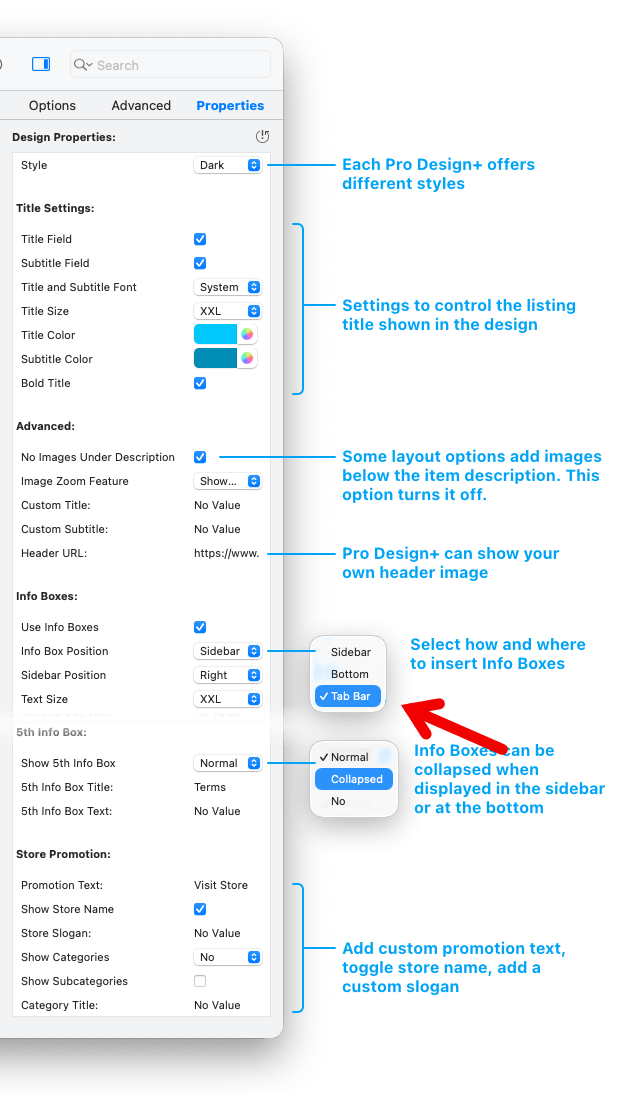
However, with the new “Pro Design+” design templates included in the upcoming GarageSale 10 there is an optional tab bar for info boxes built-in!
The documentation is not yet online but you can already give it a try.
The latest beta version of GS10 is available here:
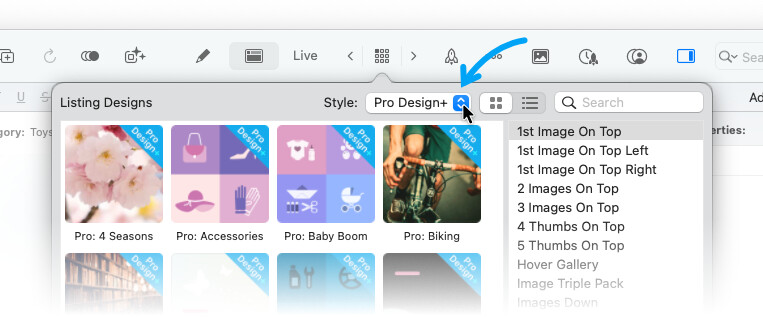
In GarageSale 10 you can select a ProDesign+:
…and select the Tab Bar option for Info Boxes in the Properties Inspector:
Yes, please see the manual here:
1 Like
Hi kristian, thanks so much for your detailed and informative reply! Carl
This topic was automatically closed 10 days after the last reply. New replies are no longer allowed.