GarageSale disk useage

Yikes. To me that seems high [I am sitting at 245.1MB Memory, though 440.1MB “Real Memory” as I do stuff with the app right now; it’s been running for a few days w/o a restart.]. That does seem like a lot - the 2.5GB - but perhaps that’s typical? Spinning beach balls though should not be typical, and I’ve always found in the past that I/O seems to be the cause of them [which generally is memory, but can be a slow HD that is unhealthy or a slow SSD that is nearing end of life]. Console might give you more info as to what GS is doing during the beach ball or just why that much memory is being used.

Beyond a spindump, a sample process can also be taken from Activity Monitor. Unsure if that would help the GS devs, but when I’m trouble shooting issues, I find it useful [it looks a bit like the crash dump that gets generated after an app has crashed and one gets the option to send the text dump to Apple, etc].

I seem to remember a previous post where it was suggested that it might be useful to schedule emptying trash overnight. I would like this function. At the moment GS is locked while Trash is emptied and this can take some time to complete.

1 Like

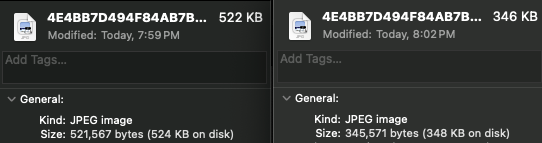
I did a re-list of 194 items on Monday which for how I have re-listing setup, the old items go to the trash after they’ve successfully been posted. After the batch was done, I emptied the trash of the 194 listings - this was instant and didn’t lock up GS for me at all. I’ve done bigger batches of re-listings and trash emptying and have never seen a pause. Most of my listings feature 10-24 images per listing [but 200kb images at 1200x1200]. I wonder if the large TIFF size has something to do with it [and no, TIFFs are not natively supported in modern browsers. looking at your latest hosted by GS image, it’s a jpg of 522kb, and quite compressed. If I convert that compressed jpeg into TIFF, it is 5.4MB in size, so I can only imagine how large the original TIFF is [at least 30MB?]. Since eBay and GS don’t use those TIFFs, and they both compress them into a fairly blurry image, why not just upload an optimized jpeg that has the same detail as the TIFF? [taking your 522kb jpg and processing it through JPEGmini Pro, the image went down to 345kb, but there wasn’t much data to start with - the larger the source, the greater the optimization can be had [see attachment - this is the https://img.iwascoding.com/paid/2026/02/10/33/4E4BB7D494F84AB7B695AE6C0A58993C.jpg image]. Anyway, if your trash has lots of 30MB+ images [looks like 2 images per listing], I can see why things are so sluggish and slow. Keeping the original scans as TIFFs makes perfect sense, but sharing those into the web, and putting the control of ebay and GS to compress your images into jpegs, doesn’t, esp. when you have issues with speed to the European GS servers - uploading a 200kb image vs a 30MB image will save you tons of time, even on your fiber network connection. And who knows, one day GS or eBay may just up and reject TIFFs being added to their systems since they can’t be viewed in a normal way by a browser.

Why must you criticize every post? 294 listings is piddling. What is wrong with a useful suggestion that cleans your trash overnight. I would prefer it if you refrain from commenting on my posts.

Regards David
0404 499 979

I never disagreed with you on having a trash schedule feature - just that it may not be so easy to add to the app, and for something that, for a user to do, normally takes no time at all. That’s all I was saying. And yes, 294 is nothing, which is why it takes less than a second to empty [and that each listing contains jpegs, not TIFFs]. But I just have the habit of emptying the trash any time GS uses it, since stuff in there is of no use to me. I can understand that if someone accidentally deletes a listing, having an easy way to recover, is good. But using the trash as a filing system is curious, as GS allows one to have folders and so one could just file into a folder and then later delete the items filed there, if need be.

I empty my Mac’s trash once a day and it currently has over 850 items in it [and it’s just past 4am now :slight_smile: ], so I do get that stuff can accumulate, but it takes my Mac just a second or 2 to empty the trash at night when I manually do it. I’m sure if I kept 10,000 listings in my trash, it might take a second or two to empty as well. The fact your GS locks up says more about the contents/size of each listing in the trash, which is why I recommended exporting jpegs into GS, rather than duplicating your DAM into GS. That’s gotta take a ton of storage space on your Mac, regardless of how big the storage is.

That’s all I was trying to say. :man_shrugging:

I restarted GS again and it has been running ~250 mb for 24 hours. Maybe a leak in something in GS? I asked Grok about my machines stats. It is a 2015 iMac with 32 GB. Grok said swap used is fine at 249 mb. That is what it was designed to run at without trashing the drives. I have plenty of open RAM with 24 used and 32 physical. I think GS is doing other processing and that is causing the momentary beach ball. Devs say it is photo resizing.

250MB for GS doesn’t seem bad at all. I think your first post said 28.15GB and then after GS was taking 2.5GB.

when you use Activity Monitor and goto the Memory tab, you can sort by Memory [or add a new column called Real Memory & sort by that]. GS does fluctuate for me. but usually Safari is the hog/king of that list simply due to how many windows/tabs I have open. Closing them helps a ton [I have a lot of YouTube tabs which are probably the biggest source of my memory pressure]. I don’t see any beach balls in any apps though. I have 32GB of memory on my 2023 Mac Studio M2 Max. I also run GS on a first generation M1 MacBook Air with 8GB of memory and use a 2015 11” MacBook Air with 8GB of memory [which was my primary GS system until 2023]. You had mentioned you had several other apps open. I keep some others open too but for troubleshooting, maybe try quitting each one and just play in GS and see if GS isn’t beach balling? Then slowly start up each of the apps you normally have running and every time you start a new app, go back into GS to see if it gets any slow downs. It’s a tedious task! But it might help to see if there’s a leak in another app.

My GS right now is using 948MB of memory/607MB Real Memory which is more than usual for me, but no beach balls. I Have several Launch Control windows up with 20-40 items in each one ready to re-list, so that may be why it’s taking up more memory.

Memory is expensive, but it does look like the late 2015 iMac will support 64GB if you want to upgrade memory. I use everymac.com to get stats about different models and they have info about the true max amount of memory supported in Macs that can still be upgraded [my Studio has memory soldered, so it’s 32GB for me until I buy another Mac].

EDIT: The mid-2015 iMac can not be upgraded past 32GB of memory - check the website above to see the exact model of your iMac to see if it can, though honestly 32GB should be enough]

In this post GS devs tell me that the spindump says it is photo resizing causing the ball of death. I can’t upgrade past 12.7.6 os because the Late 2015 iMac. I might try the 64 GB 9(grok says it works) but I hate to spend on it because the fusion drives wear out and can’t be replaced. I had a second identical computer that blew so I am on borrowed time with this one.

One of my most sworn useful apps on my Mac for GS, besides PopClip and Typinator, is JPEGmini [I finally upgraded to JPEGmini Pro, but really just the non Pro is fine for GS - Pro does video which is only useful in GS if you send videos to eBay, and I don’t]. GS is tons more responsive since I started using the app.

What it does mean is an extra step though. I don’t use the Media Picker from GS because that just pulls the file from Photos, which for me is bad due to file size and privacy [my photos have the GPS coordinates and those are kept on eBay listings when viewing the images in a layout [not the eBay gallery], so I have a workflow that adds 2 extra, but quick steps:

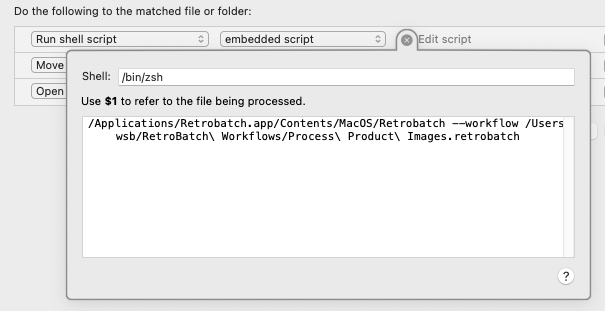
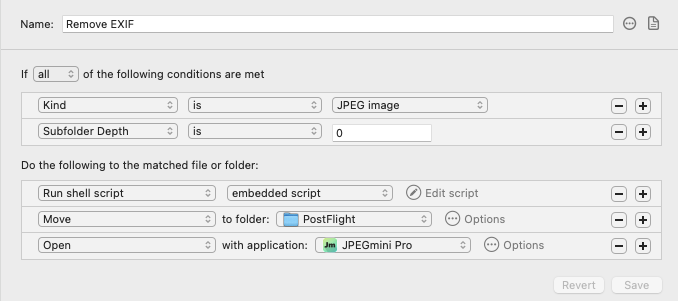
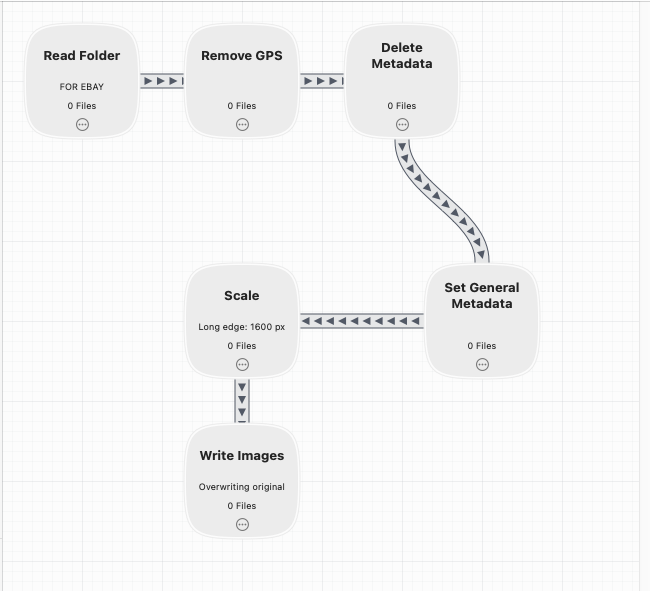
I select the images for a listing from Photos - drag them to a folder; let “magic” happen, and then drag the images from a different folder into GS. I keep a Finder window open with a folder called “For eBay” and in that folder is just one other folder called PostFlight, which remains empty. When I drag the images into For eBay, Hazel runs a Retrobatch Workflow that removes EXIF [GPS, etc] data, resizes the images to fit within 1600x1600, then overwrites the original image. Hazel then runs JPEGmini Pro on the images, overwriting them, and moves them to PostFlight. [EDIT: actually Hazel moves them, then runs JPEGmini Pro].

The result are very small [file size wise] images that do not have any human identifiable differences in quality and I drag those into my GS layout template. Since adopting this workflow over a year ago, I’ve not had any beachballs with GS, nor have I had blurry images rendered within GS [the images would not be blurry when posted to eBay, but they would look out of focus in GS, and I didn’t like that since I’d have to make sure I didn’t make a mistake when shooting the image and it really was out of focus]. I’ve attached screenshots here. I Need to explain the script as I used to run /usr/bin/shortcuts but Apple broke that [the GUI shortcuts works, but you can not run automations from Hazel using that], as they forgot to sign the command line app, so I wrote a very basic shell script that runs in Hazel.

So yeah, my image processing relies on 3 paid apps: Hazel, JPEGmini Pro, and Retrobatch. But the time and disc space it saves and the fact that GS has run buttery smooth since I applied this change [I did a one time edit of all product images already in GS after a few months of running this on new listings]. I am still on GS 9.9.2 but hope to update to the latest later this month.

Also note that my Retrobatch workflow has one step that others may not need/want - I do write some metadata after deleting all metadata from the JPEG - I simply populate the author and copyright fields with my biz name so if anyone does scrape my hosted [GS layout] images, they will still have that data embedded in them unless the scraper removes them. Also, Photos has an option as does the default iPhone camera app and many 3rd party camera apps, to not record GPS data when you shoot; I like having that data always on and selectively turning that off when sharing photos, but someone could just as easily use a 3rd party camera app dedicated to product photography, and have GPS data turned off, so you never have to worry about any eBay user seeing your exact location and camera model and all that when you shot the product photo. The biggest difference that Retrobatch makes which one can probably do for free via the Apple Shortcuts app, is the scale the image to fit the longest side into 1600px. I shoot square images for eBay since they use square product images, but my originals are much, much larger, and when I had put those into GS, it killed performance in GS. File size of images matters to both GS and to eBay customers, so keeping the images small, file size wise, but large, detail wise, is key, IMO.
p/s - if you would like more details, or a “how to” for those apps [they all have free trials] DM/PM me as I am more than happy to explain how I do this in more detail; the time it takes for Hazel/Retrobatch/JPEGmini to run on a set of 20 images is insanely fast on my Mac - 1-2 seconds tops. So for me, it does not add much extra time - just the extra step of dragging a group of images from Photos to Finder, and then dragging a group of images from Finder to GS]. I spent a long time optimizing the process and doing just the things I wanted to be done, but as explained, some steps might not be needed for some sellers and can be left off or replaced by already existing free methods.

There is something in GS that is eating a ton of RAM. It runs at around 1.05 GB after 24 hours of running at 250mb and keeps climbing.

UPDATE It has jumped to 1.37GB and it is just coasting with nothing being entered by me.

This topic was automatically closed 10 days after the last reply. New replies are no longer allowed.