The latest MacOS update has done something to the print dialog which is giving me problems in GS, and TBH I don’t know if it’s the OS (MacOS 26.2, just updated) or GS that’s falling down.
I use a perfectly simple custom packing slip in GS. When I have several orders selected, and choose Print Packing Slip… it has (for 2+ years) been working fine at printing one packing slip on each page.
Now, when I select several and print them, the result is a continuous feed of pages sent as a stream to the printer. That is, the page break is not apparently working correctly. This doesn’t seem to have anything to do with the printer settings (which hadn’t changed until I noticed the problem and tried to fiddle them to fix it), and it also happens when I preview or print to PDF.
Here for example is a screen cap of what I am wrestling with right now.
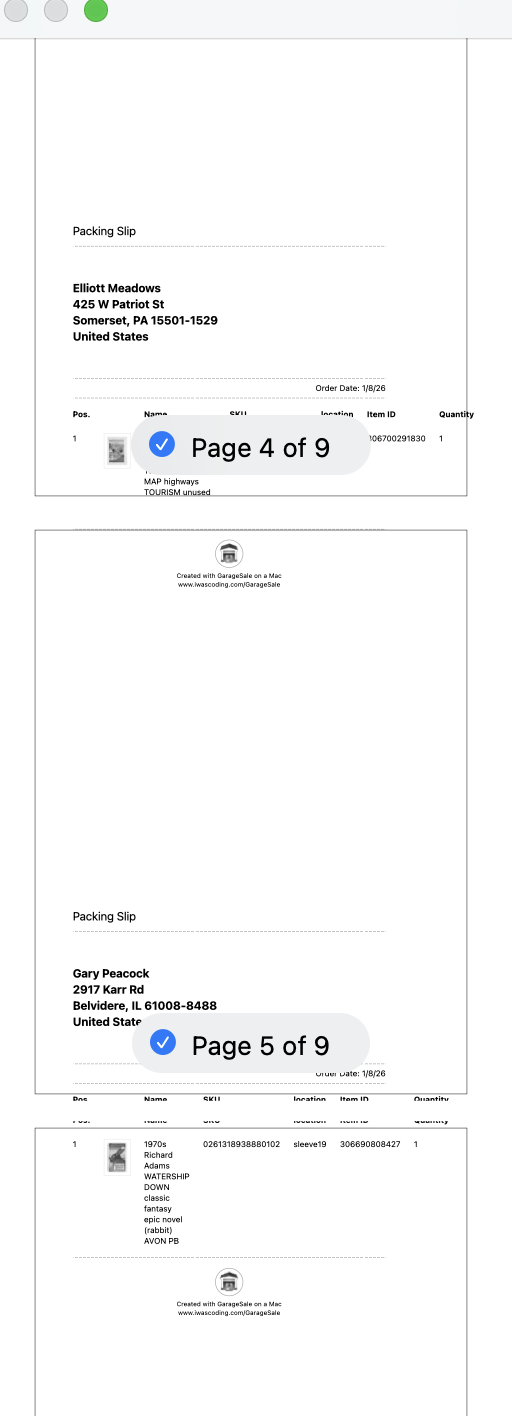
This definitely started being a problem for me with MacOS 26, and I think it only started happening from MacOS 26.2, but I am not sure. I’ve recently had a bunch of heavy sales days, with the holidays.
The workaround is: select one Order, and print its packing slip individually, for all orders. Which, obviously, is error-prone and not the desired behavior.
Later I did just check, and there are a lot of help requests from many apps saying “Tahoe 26.2 broke page layout” so this does sound like a MacOS bug. But it might also be a breaking API change; dunno.
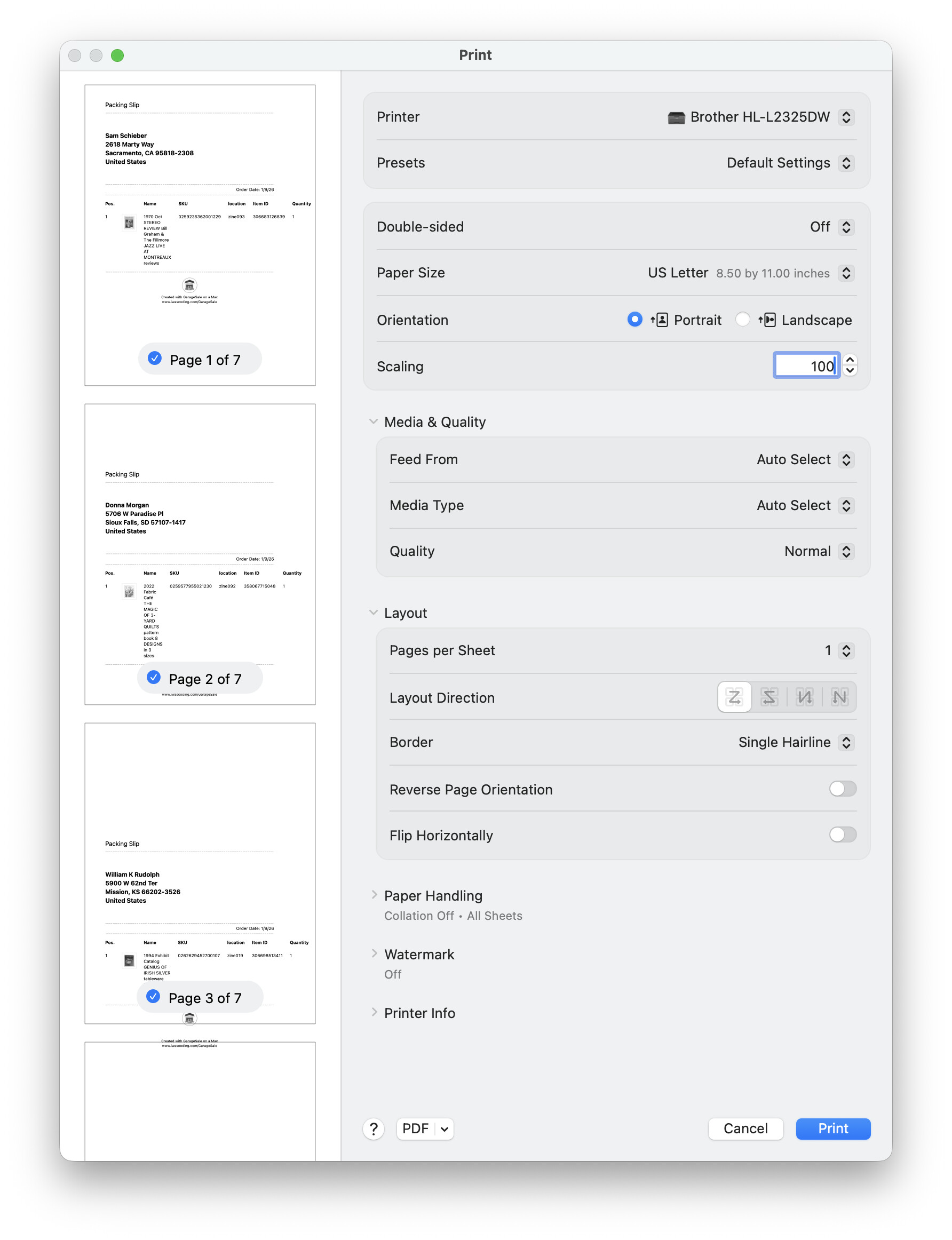
Interesting. The paper size hasn’t changed (US Letter), but I do notice that printing at 100% uses much bigger fonts when rendering, and the table I’m producing is often wider than the margins.
You can see in the screen cap above that the title of a listing is now many lines long; that used to be tidy and small. It’s got to be an Apple bug.
Sadly, printing the PDF from my Tahoe laptop still produces the same effect. Because the PDF itself has no page breaks in it. So I can’t even save the PDF to my older non-Tahoe workstation and print from there; the file is born wrong.
Could you
a) make a screenshot from your whole print dialogue so I can see the very first page and also your print settings?
b) provide me with your custom package slip? Maybe by reducing the font size and margins the issue can be fixed, that’s why I am asking.
I can do that, but the print dialog still has another bug in Tahoe which defaults to trying to print the same number of pages you printed last time, even if your document is longer, so the rest of the pages being printed will appear to be blank.
And, again, nothing has changed since last month then this worked fine. I doubt you did anything; I am 99% sure it’s a Tahoe bug.
I added hairline borders to show the page margins. You can see in the thumbnails before they are printed that the notional “top” of the packing slip pages is out of phase with the pages themselves.
The thing is, nothing has changed on my end, except the update to Tahoe 26.2. And the pages are not in any sense “full” in my layout; they are still little, mostly empty space, but they are printing slightly over-long and therefore out of phase with the actual pages of the page breaks.
It could be that I need to update my printer drivers, but that seems ridiculous since I only ever use That One Black Brother Printer (as one should).
Even if Apple changed font-family: -apple-system-font size, the page is still nowhere near full vertically, and the margins on top and bottom are only a few pixels each.
I’m going to uninstall and reinstall the printer driver and see if anything changes, first.
Nope. In fact, with absolutely no printers available, the page breaking happens the same way. It’s def a bug in the print dialog API, and not your code I bet.
This is not a solution to your issue per se, but a workaround, though a time-consuming one. I mean, the “obvious” thing is to downgrade macOS versions, but that might take longer than this idea - if you have enough drive space, you can run a virtual machine with a prior version of macOS. This would require you to install GS on your virtual machine and have it sync to your main GS [or maybe not if all you want to do is print packing slips - unsure if the thumbnail and other info from the pack slip template comes from eBay order info or GS listing info; if from eBay, then you don’t need to sync, just authorize GS to work with your eBay account in the virtual machine].
Virtual Box is a free app that runs on Mac, and these step by step instructions might be a good starting point, if you want to go this way.
FYI, I did more research, and there are several known issues with 26.2 and the printing system. There was a security fix that has caused the print system to ignore the CUPS configuration file, and another that produces super wonky font sizes/margins, etc. Some printers [HP] can’t even print - USB or network. Different fixes for different issues, mostly lots of settings tweaking or uninstalling Adobe Acrobat or doing a full system install [clean, no data]. Sigh. The fact that this is the macOS that is the last one that works with Intel CPUs is just aaaah. Each release Apple makes, they break more and more, even stuff from 14.74 to 14.75 and 26.1 to 26.2.
Yes, I was revisiting the developer discussions and… things are not great. Part of the social problem seems to be that every third-party app that has a printing bug seems to have a slightly different symptom: I see a lot of “prints blank pages”, “prints pages but only 2cm wide”, and “doesn’t obey page breaks” with no effort. I expect other things are broken, too.
The strangest thing, to me, is that the reason I said “[again]” in the title of this thread is that MacOS whatever-the-last-one-was also broke the Print Preview pane in a very confusing way (by defaulting to only print the same number of pages as you selected last time, even if you choose “print all” as a default). It only got fixed after a few bug fix releases, with almost no mention.
That same bug reappeared as a regression when I installed MacOS 26.0 beta (as a developer I risk this sort of stupid stuff, despite regretting it). And it’s still active in 26.2. I just never mentioned it here, because it’s familiar from the Old Days.
It honestly might be best if I do a clean install of the OS. It might be that simple.
I see what you’re thinking, but sadly no. The page breaks still end up scrolling.
If I had to guess, they have somehow accidentally added an extra margin/padding on all pages (and all sides), and that throws all the pages after the first one out of phase. I mean, even the first one is wrong, but it still usually ends up inside the bounding box. No matter what the document’s page breaks are, there is an extra margin added that gets them out of phase. I think “CUPS printing is broken” is a good summary.
Evidence: When I have a really long packing slip that does want to use two pages, the page break between it and the next one works relatively correctly, forcing the top of the second one to a new page. But the next packing slip is incorrectly shifted downwards in addition to moving to the next clean page.
By the time I print 4-5, every slip “starts” 3/4 of the way down a page.
I guess, you are right. They must have changed something in macOS 26.2 (or introduced a bug) that somehow adds margins to the pages. I tried to find a way around this but wasn’t successful so far.