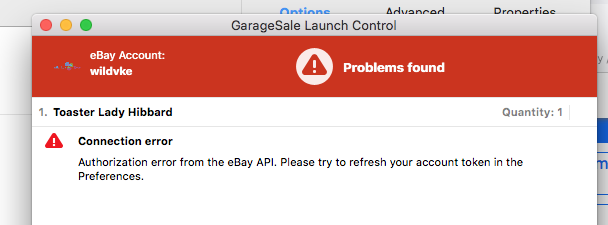
I’m getting an ‘error’ message when trying to upload content via GarageSale. I get this message when trying to update my Access Token through the GS app. Anyone know what the fix might be.
GS Version; 9.9.3 (1723) MAC: 10.13.6 (17G14042)
Invalid Token. eBay.
{“error_id”:“unauthorized_client”,“error_description”:“The OAuth client was not found.”,“http_status_code”:401}
Totally mis-read your issue, ignore my suggestion as that’s what’s causing the problem for some reason!
1 Like
Too funny, but your initials and mine (maiden is LaBelle) are the same. LOL
1 Like
Oh that’s awesome!!  I hope the devs get back to you soon with a solution! Sorry my solution was clearly wrong…I blame still being asleep late this morning.
1 Like
I hope someone does get back soon. I can’t even access the 100+ pieces I have on eBay through the GS app. LOL. Cheers!
Hi,
this is due to an incompatibility of eBay, third-party clients (aka GarageSale) and your (very old) macOS version. Is there any possibility that you can upgrade your macOS to a more recent version?
Best Regards,
Paul Hecker
1 Like
LOL, very old, so an 8 yr old computer is too old for the GS program? So there was absolutely nothing wrong with this 2 weeks ago. I do believe there was a recent update to GS. So I have to update, because GS updated and my Mac doesn’t agree?
If you use Time Machine, you can always roll back the version of GS you were using, though to my knowledge 9.9.4 is the latest version. I still run 9.9.2 w/o issue, so if your Mac supports it [and since you run 9.9.3, it probably does], I would roll back to that version.
If you don’t have Time Machine, then I would download 9.9.2 from the GS website https://downloads.iwascoding.com/downloads/GarageSale_9.9.2.dmg I believe is the link, but you may want to confirm that the preferences and database used by 9.9.3 is compatible with 9.9.2 from the developers before you do that.
1 Like
Did you already check if there is a system update available for your Mac? You can do this in the macOS System Preferences > General.
macOS 11 or newer is recommended. The latest version is macOS 26 Tahoe.
1 Like
Yes, I have checked. It shows no compatible updates. I do believe that Ventura is compatible with my system, so I will try updating to that.
Ty. I will try to update to the Ventura as it seems to be the highest version that is compatible with my ‘very old’ iMac.
EDIT: I am backing up my system before this. I had turned off the timeMachine last year, because I deleted some of the old TM redundant files and put them in the trash and I couldn’t delete them… they are still in my trash, not allowing to delete… Pain the arse. Anyway. So much for tech making life easier!
Well so much for updating to Ventura. I use Lightroom 1.4.1 and there is not an update for it on my mac. Ventura says it will not work if I do the update, so poo. not updating to Ventura. I guess I’m stuck.
Will GarageSale version 9.9.2 work for her? Is there harm in downloading it and trying? [eg: any behind the scenes database changes that are not backwards compatible?]
1 Like
This is technically difficult I realize, but I use OpenCore Legacy Patcher to run a newer MacOS on an old Mac mini that can’t run anything past High Sierra.
Again, not recommending it unless you really don’t want to upgrade the OS or hardware to modern standards, but it honestly does work if you take your time and work through the instructions carefully.
2 Likes
This topic was automatically closed 10 days after the last reply. New replies are no longer allowed.