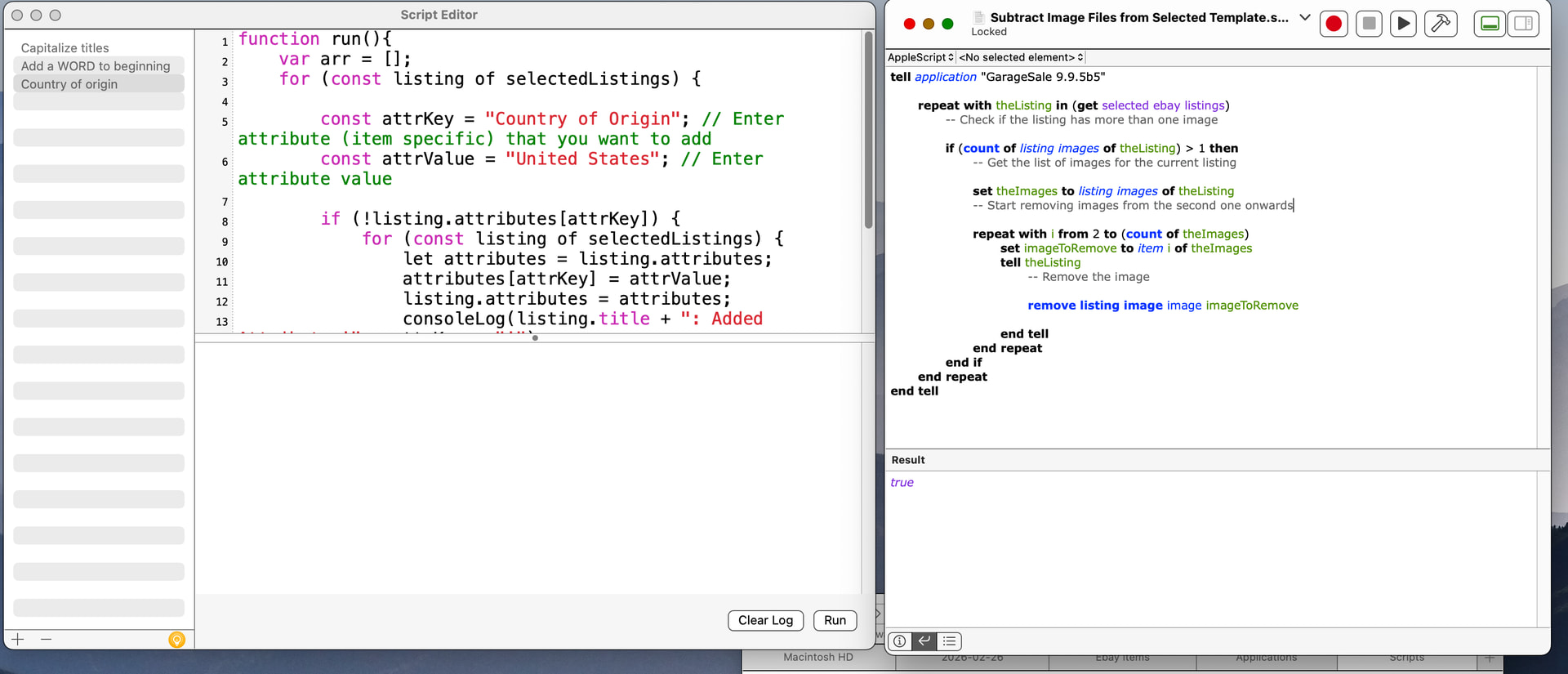
This script checks if item specific “Country of Origin” already exists and - if not - adds it with the given value (default is “Unknown”) to all selected listings.
Feel free to modify and improve it to fit your needs.
Disclaimer:
You might want to test this script with one single listing first.
// This script checks if item specific "Country of Origin" already exists and - if not - adds it with the given value (attrValue) to all selected listings
function run(){
	var arr = [];
	for (const listing of selectedListings) {

		const attrKey = "Country of Origin"; // Enter attribute (item specific) that you want to add
		const attrValue = "Unknown"; // Enter attribute value

		if (!listing.attributes[attrKey]) {
			for (const listing of selectedListings) {
				let attributes = listing.attributes;
				attributes[attrKey] = attrValue;
				listing.attributes = attributes;
				consoleLog(listing.title + ": Added Attribute '" + attrKey + "'");
				arr.push(listing);
			}
		}
	}
	showListings(arr, "These listings use value 'Unknown' for 'Country of Origin' attribute:");
}
To use this script open GarageSale’s script editor, click the + button and paste the script. Select one or more listings in GarageSale’s main window, then click the “Run” button in script editor.
Item Specifics is what worked for me in the US - after applying the change to several items, I selected them for revision and check marked “Item Specifics”. Loading the listing up [that did not have a country of origin prior to the revision] then shows the United States as the country of origin.
EDIT: Category is for picking what eBay category you want the item in - so if I made a mistake and put something as a book that was really a cross stitch pattern booklet, then I would change that in GS, update the attributes, and revise category and item specifics. [I speak from experience ]
I thanked you in the other thread, but just to do so again - THANK YOU!
Overall question about the script feature - is having an “undo script actions” something on the road map for when one does make a mistake, and applies a script to multiple [or a single] listings, and needs to undo whatever the script did? I think the feature of having the ability to apply js to listings is awesome! It just would be nice to have the power to undo the action when a mistake happens.
Everything that you put inside the script editor has to be JavaScript. Apple Script [which I am shocked anyone still uses!] starts off with a line that will say “Tell Application XXXXXX” eg” Tell Application Garage Sale”.
When it is Apple Script, you have to run through some hoops to get it to work - save the script as a text, end the file name in scpt, and then either run it in the Script Editor located in the Utilities Folder within the Applications folder, or save it as a “droplet” and drag stuff to it.
Apple Script is very, very old - pre- Mac OS X days - so I would be surprised that it will be supported much longer. Mac OS X, and now macOS are BSD based, so you can run shell scripts [stuff that’s popular in the Linux community], and with GS, you can run JavaScript from its own script editor].
And FWIW, several years ago, Apple put Apple Script into maintenance mode - meaning no further updates will happen for it, and the team that developed it was disbanded. They have pushed using Shortcuts which is so much more powerful, much easier to use even if one is not a programmer, and nearly every app from 3rd party developers supports it. Shortcuts comes with every Mac. The main reason my workflow doesn’t use it is that Apple made a giant mistake with 14.7.5 and 14.7.6 and removed the special privileges the command line version had [the GUI still works fine]. The command line version can be called from shell scripts which is what I had been doing; I was able to alter my shell script to bypass Shortcuts, but for automated stuff, the command line is very, very handy. But for doing things like removing the first image - a GUI shortcut can be made. Shortcuts are basically the next evolution of Apple Script - a LOT more powerful, and a lot more simple to write.
I already have a keyboard shortcut programmed to remove all photos but it was a menu item that I could choose and make the shortcut. GS would have to make a menu item that I could choose and then create a keyboard shortcut from.
You misunderstand - Shortcuts is an app on the Mac. I am not talking about a keyboard shortcut. Shortcuts is what replaced Apple Script many years ago.
You can find 1000s of Shortcuts online that you can edit/customize, etc, Reddit has a great Shortcuts subreddit too. The app is very powerful and has nothing to do with keyboard shortcuts.
 ]
] Ok. I am officially blind!