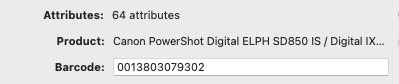
Noticing that digital cameras become a pain to sell in GS. Example UPC - 0013803079302
For me that fetches 64 attributes! But if I try to sell this, I get an error from eBay stating I can only have a maximum of 45 attributes. So now I have to randomly delete a bunch of them. If one is selling a lot of cameras [and I recently have a bulk buy of several, so this is gonna be a pain], this is a pain. How/why does GS fetch more data than is allowed to send back to eBay? How can this be fixed without having to do so much mouse/trackpad clicking? Thanks.
I can do better. If you auto-fill the attributes, and then open the Attributes dropdown and select Add All Suggested Details it will pop up to 75!
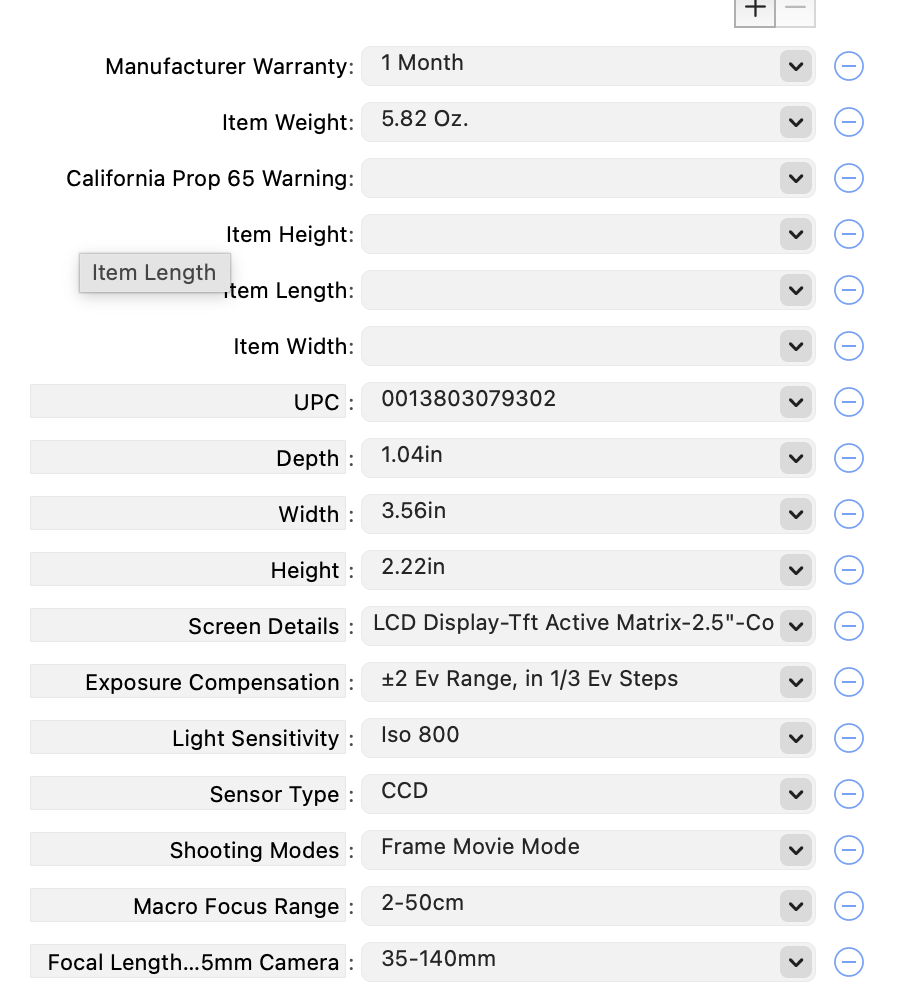
That said, if you look at the dropdown (whether it’s 64 or 75), you may see that some of them (hopefully all near the bottom) are optional ones, with editable keys on the left as well as values on the right.
This happens for me whenever I list a textbook, it seems like. Too much information from the publisher.
In my setup, the optional ones always seem to end up at the bottom of the list. I think I recall a View setting or something to order them.
At any rate, if you scroll to the bottom of the dropdown and - the optional ones, at least they won’t be randomly deleted, and you (AFAIK) can’t remove anything that is absolutely required by the category setting on eBay.
Later: Technically I suppose these are not strictly “optional”, but rather are not specified in the Category’s Attributes data structure. I think all the chaff comes from database-dumps of JSON information from big sellers or manufacturers, and it doesn’t exactly map onto the ontology of eBay’s Attributes interface.
In any case, nothing with a gray left-hand side is ever a required attribute.
Are the cameras you’re listing going to be the same UPC, or at least repeat?
If so, the cut-and-paste inside the Attributes window might help. If you prune one down to the right size after auto-filling, then use the Copy Settings dropdown (under the gear in the Attributes pane), it can be pasted into the duplicate listings if needed.
Almost certainly you know that, already, but it’s in the spirit of the GS discourse to at least write down the obvious stuff that might not help
This is, honestly, one of the biggest reasons I gave up on any cameras and electronics.
Thank you for all the useful info! Never stop writing down the obvious stuff, and some stuff in GS isn’t as obvious to everyone as it might/should be [eg: I never knew the tiny scissors icon in the Item Specifics section will, when clicked on, trim the length of the value to adhere to the maximum allowed by eBay].
Sadly, I do already know about the copy/paste attributes as I have used that quite a lot. But also sadly, not many of the cameras I got are the same model [or the ones that are, are a different color w/ a different UPC hah!]. But there’s a few that are the same model, so I think I will save them for last [always like to do the most time consuming stuff first ].
I am curious how the eBay API allows huge data retrievals from its database, yet you can’t stick the same data back into it - eg: pulling 75 attributes, but only able to send 45 back. How did the 75 get there to begin with?
What I’ve been doing so far is just deleting attributes based on [IMO] usefulness. Like one I accidentally kept in for a listing, but deleted on others, was “Special Effects: Vivid Audio Red” which is….what? for a point and shoot camera? Huh? Hahah… [and I’ve been a professional photographer and sometimes still am!].
I have a boat load of other electronics to list too; this is going to be….time consuming…aaaah. [I’ve been doing books & media for soooo long that lately I’ve been acquiring inventory of other kinds of stuff to help keep my interest in this biz. But now I am discovering some of the quirks of GS as I explore these other categories.
Well I notice in the screen cap I shared that the official API key is “Item width” and the optional key listed just below is “Width”. So I imagine that the “extra” information comes from a catalog dump from the manufacturer.
This is why bestseller books also have a load of useless stuff in their Item Attributes, like “TOC" and “Reviews", which are apparently both unsupported JSON arrays of strings or something.
Interesting that the top ones from your screen capture are semi-required [or rather, the field names themselves can’t be changed], yet they are empty.
How do publishers/manufactures get their data into eBay? I guess there’s a specific API just for them to dump their catalog info into eBay. But then the eBay API that GS uses should not be able to grab all that data out of it; just what’s needed to list an item.
I used to use an AppleScript to trim the reviews to 65 characters but recently became aware that in the preview mode you see a small scissors icon that clicking on will clip the field to be whatever the max allowable value is. Yay?
Oh this gives me an idea for an actionable use case:
Currently, the Item Attributes dropdown has Add All Required Details and Add Suggested Details, which add the keys and empty value interface for each.
What I think might be useful here (and I would also use it frequently) is something that, if a lot of details are present, will Remove Non-required Details. That is, if there are 75 random things in the window brought in from the catalog chaff, I would like something that trims away all but the required ones for that category, now that they’re filled in.
And if they’re not filled in, leaves them there empty so I can see them before a warning appears.
A few years back a local photographic club sold their entire collection of vintage and antique cameras at auction.
They were sold by the box full - $2.50, $3.00, $4.00 for one of more boxes. The most I paid was $12.50 for three boxes. Some were in larger boxes.
Most of the boxes were the large cardboard trays they typically sell large soft drinks or canned goods. The local auctioneer gets these from a local beer and soft drink distributor.
These included foldout antique cameras and box camera from the later 1800s and early 1900s a well as cameras dating into the 1960s. These were cameras that used film, tin or glass plates. They do not have UPC codes.
I never used any item specifics on these cameras or for that matter on any other items.
I detest item specifics.
Any minimum details are in the description, which are easily obtained from online camera reference sites. I generally only list the make, model, markings on the lens.
No way am I going to read through paragraphs of item specifics and somehow confirm that every single detail is 100% correct. In many cases it might not be correct due to users modifying the cameras.
My templates utilizes a set of commonly minimum required item specifics which are all set to “N/A” or something similar.


 ].
].