I have had this issue for quite some time. When adding part numbers in the attributes of a category related to my listing, the MPN field, my multiple and time consuming part numbers disappear. I have tried deleting the category and starting over, with no success. The only option I have at this point is to revise in ebay. This bug doesn’t happen with every listing, it’s random. Also, still experiencing the Chrome Facebook TR page when I revise a listing or go to live mode in Garage Sale.
Please let us know which version of GarageSale you have installed. (Just select ‘About GarageSale’ from the ‘GarageSale’ menu in GarageSale.)
The latest version is GarageSale 9.9.3. (released yesterday)
Also, can you post a screenshot that shows where exactly you are adding the part numbers?
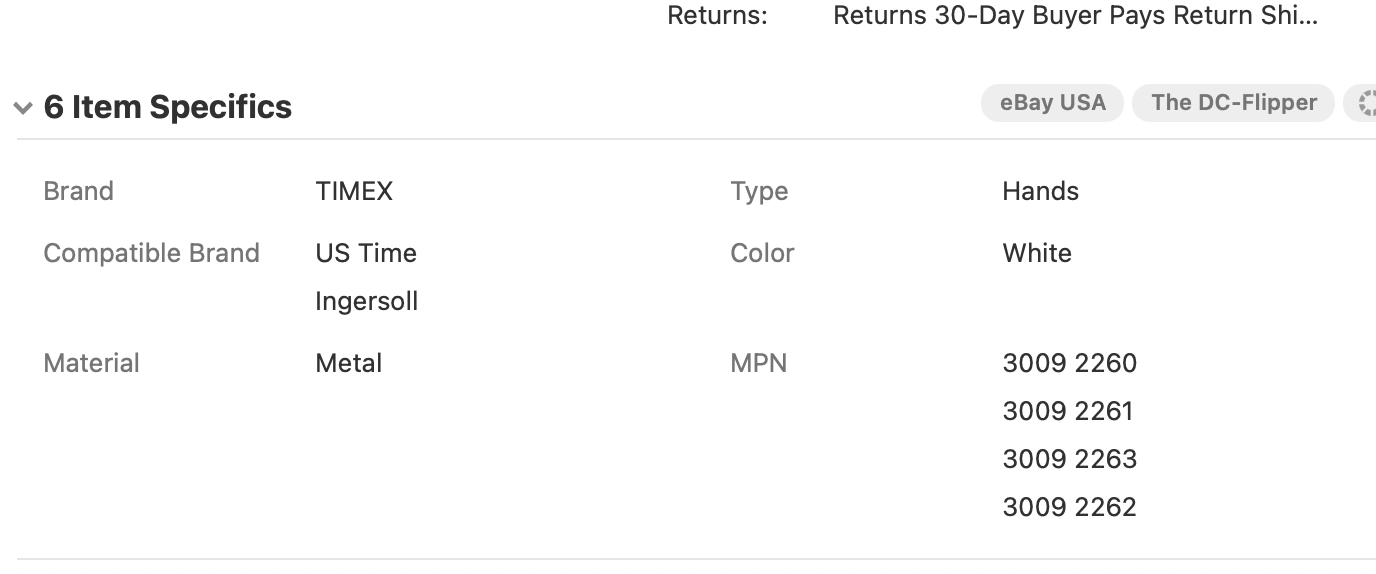
Really strange that you still see the Facebook page in GarageSale 9.9.3. That’s a bummer 
Chrome is your default browser, I guess?
At what steps exactly do your MPN values disappear? After restarting GarageSale? after switching to another listing? While still typing?
Has this ever happened with a completely new listing created from scratch?
Hello Kristian. I just uploaded to the most recent version right before sending you the screenshot. No more FB page!!  For the MPN issue. Yes, it happened with all scenarios you mentioned.
What you could try is to insert the MPN numbers in the attribute panel directly (in Inspector), instead of using “Item Specifics” area in Preview mode. Maybe that will work better for you.
I will give that a try and report back. Thank you.
Hello Kristian. I have added about 20 listings yesterday and today, using the inspector panel, as you suggested, good news, so far, so good. MPN numbers are searchable on eBay, this aspect is very important for my business model. So glad, it is working. I should have reached out sooner, as this has been an issue I have had for months. Thanks for your help!!!
This topic was automatically closed 10 days after the last reply. New replies are no longer allowed.