To start new listings, I could enter HTML code into a box on my MacBook screen, plus if I were using a previous listing as a template, my “footer” with my memberships and other information was already there. Now, I just get a box that shows the HTML code as plain text. The “footer” has disappeared.
The “inspector” or whatever it is on the right had a button at the bottom to choose how to add the illustration; now the “inspector” ends at SKU and I have to drag-and-drop the illustration file.
I’ve tried nearly every menu and can’t get back to where I was. At the moment, GarageSale is unuseable for me. I even restarted GS twice and my MacBook Pro once.
I have the latest OS, the latest GS and my eBay token is good until December 2027.
Could it be that you recently upgraded from the old GarageSale 6 to the most recent version GarageSale 9? I’m asking this because the main interface hasn’t changed much in the last years.
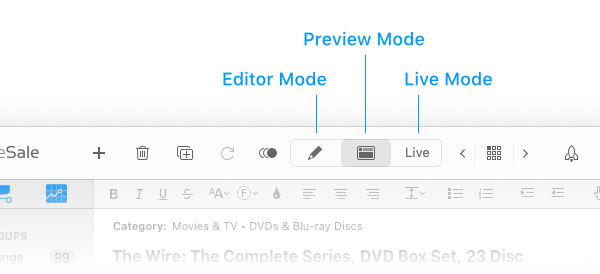
In Editor Mode you can work with plain, text, formatted text, HTML code, and even Markdown.
In Preview Mode you can enter your item description also and the footer is displayed there, too!
There are many ways you can add images. Images can be added to your listing from GarageSale’s Photo browser, from the Finder, or through the “+” button in Editor mode.
Please learn in the GarageSale help here.
Can you maybe post a screenshot of your GarageSale main window showing the problems you’re having?
Thank you. Going into Editor mode put me back where I’m used to. But the only way I could find it was to ask in the Help window for “Editor mode.” It’s CMD-1. Still not sure where that option is in the dropdown menus. Thanks again.
I “moused over” those icons but they didn’t say what they were. (“Live” was fairly obvious.) Now I know. Thanks again. I am a Happy Camper (as much as my nature allows).