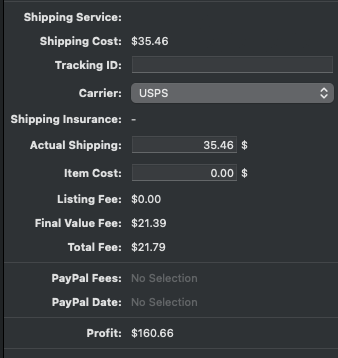
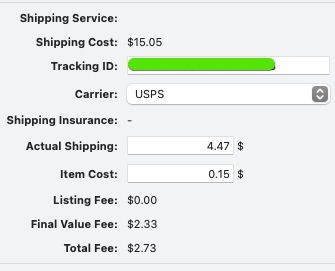
Noticed that this international order had populated the Actual Shipping field with the Shipping Cost field. In this case, the customer had a $0.00 shipping charge from me - but because this is an eIS order, I do not see what eBay actually charges the customer for shipping [from what I am assuming from this $15.05 - that is the API pulling that info into GS]. Normally if I am charging a customer for shipping, that charge shows up in both fields - Shipping Cost and Actual Shipping. And that’s fine [even though the Actual Shipping field requires me to update it since I often use flat rate shipping charge via business polices, but the actual shipping I pay varies]. I do not use eBay shipping labels, but rather use Endicia for Mac.
Using GS 9.9.2; maybe this is fixed in current version, but for eIS [eBay International Shipping] orders, it seems the Shipping Cost field is not accurately being pulled from eBay; the API seems to be grabbing whatever eBay is charging the customer for shipping, regardless of what I have assigned the shipping charge to be for the listing.
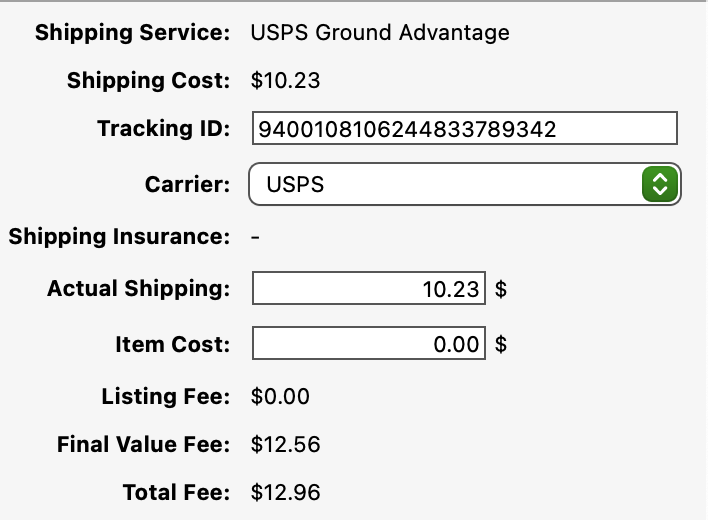
Are you manually entering the actual Shipping? In my case GS is just entering the shipping cost. In my screen shot, I paid $6.07 and GS says $10.23, the amount that ebay collected.
Yes, normally I have to manually enter my actual shipping cost, since I do not use eBay shipping. So I would expect that field to be blank. For eIS orders, that field is filled out with the cost that the customer paid, which is never what I charge since eBay has its own shipping charges it passes on to eIS customers.
Actual Shipping should be the actual cost we sellers paid for the shipping, not what we [or eBay] charges customers. For me, under GS 9.9.2, the Actual Shipping field is always $0.00 unless it is an eIS order. I then put the cost from Endicia for Mac into that field, after I print a shipping label.
I should note that my very first screen shot that shows $4.47 as the actual shipping cost - that was entered by me after I saw that GS had populated that with $15.05 which is what eBay charged the eIS customer [I had free shipping on the item]. Again, normally for me the actual shipping field is blank [technically it shows 0.00] and I manually input the cost I paid in Endicia for Mac. if I used eBay shipping labels then I would assume GS would put in the shipping that I was charged by eBay’s shipping label system, but since I don’t, I am fine with it staying 0.00. It is just odd that for eIS orders, GS grabs data that the customer paid that eBay charged them.
No, GS leaves the shipping that the customer pays and doesn’t record anything different that I actually pay. The GS numbers can’t be reliably used for tax reporting or anything else except what the customer pays ebay.
Maybe that’s changed in newer versions. For me, on 9.9.2, Actual Shipping fields are always left blank by GS….aaaah, except for the few things I do charge shipping for, as I see now. A lot of 7 books I put a flat rate of $6.99, and it did not cost me that. So yeah, the Actual Shipping field should never, ever equal the “Shipping Cost” field, IMO. I have my own inventory program, but I was playing around with using GS to keep track of numbers to see if it might be easier [spoiler alert - sadly it isn’t].
I’ve only ever used eBay Shipping once [eg: I used the eBay website to buy a shipping label]. Maybe most GS sellers do that, and then GS populates the Actual Shipping field with whatever the seller paid for the shipping label on eBay?
It would be nice for GS to let the seller fill in the Actual Shipping field either manually, or by pulling in whatever value a seller paid for shipping labels via eBay Shipping. I think it’s bad behavior for GS to assume that what we charge the customer for shipping is the actual shipping cost for the seller.
99.9999% of the time I buy labels on ebay. The last time I didn’t was 2 times in April 2025. GS always just populates with what the customer pays at checkout. I have GS history that goes back to 2021. Back then shipping was all $0.00 in shipping fields. In 11/2023 GS started getting identical numbers in both fields. Using 9.9.5b1 everything is the same and packages not yet shipped have the actual shipping already entered.
Yikes. Thanks for that info. That doesn’t seem right at all to me. I mean, back in 2021 it seems like it worked well [I was using GS then too, but not as active on eBay as I became in 2023]. I wonder why they changed it in November 2023.
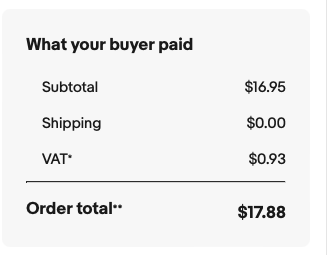
Here’s an example that just happened a few minutes ago. an eIS order came in - it’s going to Canada. It was for a lot / bundle of 34 comics. I charged $9.99 as a shipping charge for the customer. But because this is an eIS customer they were charged $35.46 and that’s what is showing up in GS.
I am about to pack the order up and process it in Endicia, but as a roughly 5 pound box going from NC to IL, it will cost me about $8.44. But GS went ahead and used the price charged to the customer, not what I charged the customer, for shipping in both the Shipping Cost field and in the Actual Shipping field.
As discussed above, the Actual Shipping field should be exactly that - what we the seller pay in shipping. This should only ever be filled in if one is using eBay shipping and GS grabs the postage we paid via API directly from eBay shipping. As I am using Endicia for Mac, I would expect to fill that in manually, but never have it automatically filled in for me.
To balance the field out correctly that field or another new one should account for refunds done by a seller to reflect combined shipping when ebay overcharges on shipping and the seller refunds excess shipping back to the buyer. Ebay chooses to call combined shipping just adding up 2 shipping costs instead of adding up weights of combined shipping and charging the much lower cost of a single package
Well, “Actual Shipping” should reflect the final seller’s cost. Unsure what you mean about adding 2 shipping costs. You can create combined shipping rules based on weight.
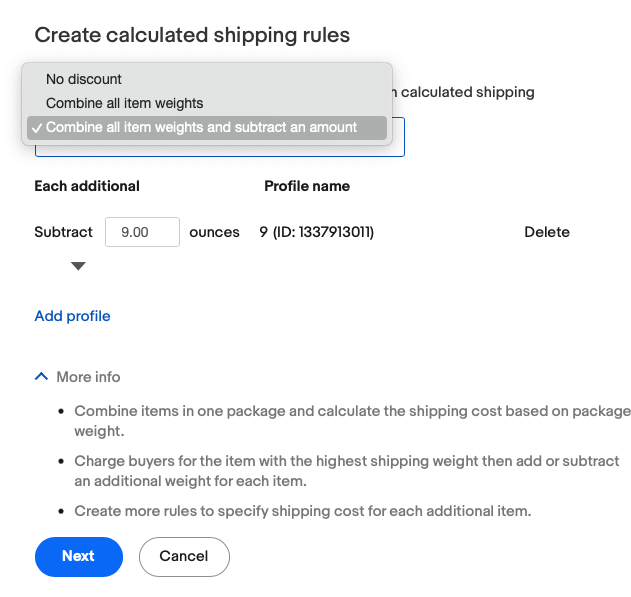
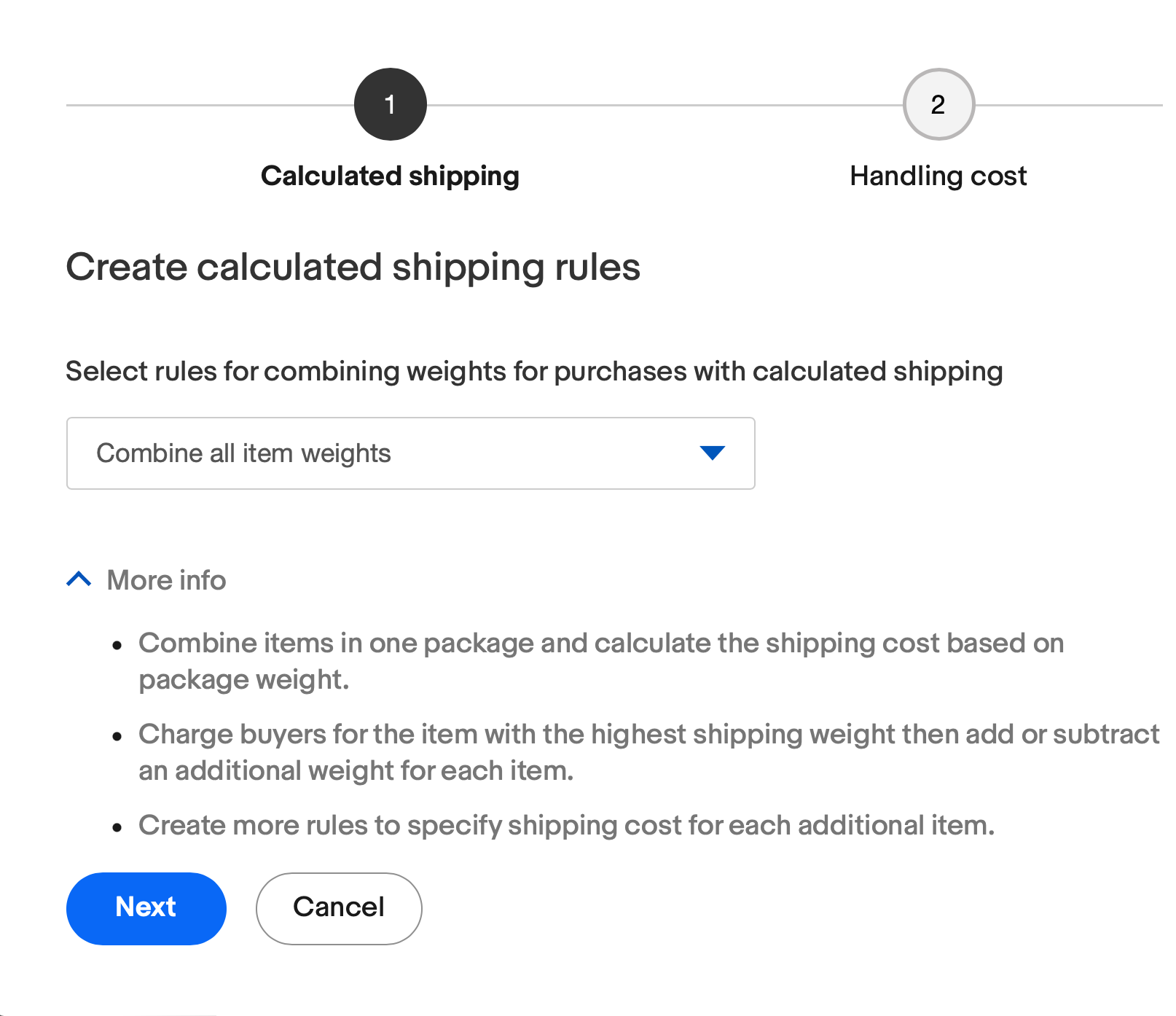
I just checked my settings on ebay. I have 1 rule. It is set to combine all item weights. That is what I want to do. Ebay combines one 4 ounce package cost ($5.07) and another 4 ounce package cost ($5.07) and charges $10.14 and not an 8 ounce package that should be $5.45.
When you apply your 1 rule to your biz profiles - are your biz profiles [for shipping] all flat rate, or do they use calculated shipping? Because the way eBay combined shipping works, is it will in fact add up the weights so you would be charging the 8oz rate, not two rates of 4oz each. This help page shows how to set that up:
For me, I have not seen the behavior you describe for combined shipping.
I missed that second business policy click box. Maybe it will combine correctly now. I did call in to ebay and they said I was set right earlier last year. Interested to see if it clears up the behavior
 I mean, back in 2021 it seems like it worked well [I was using GS then too, but not as active on eBay as I became in 2023]. I wonder why they changed it in November 2023.