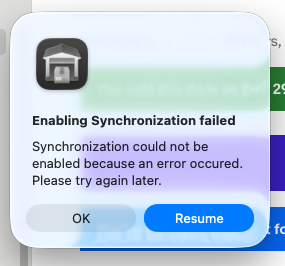
I’m having problems uploading data to the GS sync server, tried twice and after a few hours failed. 3rd try was with direct cable between router and computer, no other apps running and eliminated my VPN thinking to speed up the data transfer to avoid a timing out situation - still failed. I get this generic error message: “Synchronization could not be enabled because an error occured. Please try again later.” I’m at the point looking at my activity monitor that I’ve transfer a total of 2GB of data (not necessarily all from GS). So now when it fails, I click the resume button and more data appears to be flowing for a short while. Not sure if clicking the resume button maintains a contiguous data transfer, or if I’m just fooling myself. The downloading data bar appears to move every so often. But the sync keeps failing. Any suggestions, I need to maintain my listing on two separate computers although the eventual target of the sync download will become my main device. Please suggest what I should do to get a successful upload. I’m now at 2.42GB of data transfer by continuing to click the resume button. Thank you!
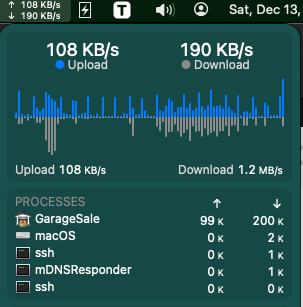
I have slow DSL, and have a similar issue to you - been trying to get a full sync to my laptop for months. I am getting fiber very soon [they just need to “turn it on” at one end] so I figure that might help. But my post is to point out a great utility which can show you the bandwidth being used just by GS. It’s called iStat Menus. While it does not keep a running total of data transferred per app, it does show the activity for the app. GS is always hogging most of the bandwidth for me when BackBlaze is paused [I keep GS running 24/7]. It might be a good tool to have to monitor if GS is actually sending data [and how fast it is sending it]. I am unsure where the GS sync server[s?] is/are located and so there could be bandwidth issues if it’s far away or if the server itself has limited bandwidth. I am unsure why all the data is needed to be synced always from the GS sync server. eBay items listed can have their images brought down from there or from the image hosting service [I use my own WebDAV server a few miles away on a server I have co-located at a large facility], and listings 90 days old that have sold can also have their images download from eBay. But it appears all data being synced comes from the GS sync server[s], making first sync very, very slow [I think I started my sync at the end of June and…yeah…no dice still - I haven’t tried recently as I was told that when the first sync happens, the main computer should not be running GS, but I need to be running my business, so the only times GS can really be taken down are when I’m sleeping. Which, as it is 4:45am right now my time, is clearly not a very long period of time!  ]
]
I have the same exact problems. They have not provided an answer on email. At this point I’ve sent logs and troubleshot this for hours I gave up and just started exporting from one machine to another at this point
@jazzimus To be honest, I was still waiting for a clear answer to my questions. (I’m here to help, but first I need to understand your situation.)
I just gave it another try and sent you another message
As long as you get a “Resume” button, please use it. It guess that your synching upload gets timed out, but hopefully it will finally be successful if you keep resuming it. 
I resumed 20+ times, and gave up. The resume fails after a few minutes. The progress bar was more than 3/4ths complete during each of my 3 tries.
@sunsync You are trying to enable the initial synching on your main Mac if I got this correctly. (You don’t use synching on an other Mac already.)
If so, can you please give this a try?:
-
In GarageSale, choose “Help” menu > “Open Library Folder”
-
With the library folder open, quit GarageSale
-
In that library folder find the “Synch.leveldb” folder and the “SynchLog.txt” file. Delete both.
-
Start GarageSale and try to enable synching. In the prompt select “Overwrite Data on Server”.
Please also make sure that you are using the latest version of GarageSale (version 9.9.4) and that your Internet connection remains stable.
If it still won’t work, please send me a support message.
Ditto for me Sun…………..
I’m sure I did at least 20, if not more, since June. Having to keep my main GS install turned off on my Mac Studio just didn’t help as I have that running 24/7 as this is my business. I would hope that a sync could still happen even if one of the 2 Macs is running GS.
Thanks for the suggestions Kristian. Unfortunately, fyi I was trying to sync to a new laptop before a trip, so I won’t be able to respond until I return. And then I’ll try it right away. Cheers!
Hi,
can you (all) tell me which macOS version do you use? As I can not find any logs on the server that give me a hint what is causing this (repeatedly) occurring timeouts? If you use an older macOS version that may have issues with the http requests?
Maybe your IP address would make sense too to track this down further on our servers.
Thanks,
Paul
Hi,
while digging through the source code I found another way that may circumvent timeout issues. Please try to enter the following command into the Terminal application and hit enter:
defaults write com.iwascoding.garagesale9 syncingTimeoutForRequest 120
Please tell me if this helps with the syncing retry/resume issues.
Thanks,
Paul
I’ll give that a try - I will enable that feature on both my Studio and the laptop - the Studio times out sometimes randomly - which stops all schedules from running, and fetching new orders, etc], but the laptop is what I had issues syncing with - getting that first sync correctly done [I think it may have thought it finished, but nothing looked synced in GS - listings not put in their folders, etc].
Is it still true that when syncing only one Mac can be running GS? That’s been my biggest issue, as I keep GS on 24/7. Only times I’ve tried to follow the “one Mac rule” is when I’ve gone to bed and don’t have scheduled listings. Then I turn off GS from the Studio and try the sync on my laptop before I fall asleep.
Anyway, I’ll add that to both computers and give the laptop sync a try again. Thanks!
I’ve put that command into my system, but when Backblaze is running, I often still get the same timeout window from GS that pops up and stops all other operations. GS 9.9.2, macOS 14.7.5. I am on a DSL connection [officially 20 Mbps down, 2 Mbps up, but since September 2024 due to Hurricane Helene, the DSL infrastructure here went downhill fast, which is why they are rolling out fiber so quickly [I should get it “soon”, according to their techs], so it’s more like 13 down, 1.2 up. As a result, GS uses the most bandwidth even when I’m not using the app, as long as Backblaze is paused.
Backblaze is a remote backup service, so it tends to use my upload bandwidth when it’s running. It competes with GS sync for uploading, and seems to win by means of giving GS the timeout popup window which then freezes any operations scheduled in GS.
I instinctively clicked the okay button, but I got another sync failed during the night [GS was still in dark mode]. Clicked okay, GS switches to light mode and resumes syncing, but if I had scheduled listings, they would not have run until I clicked the okay button. This is with defaults() command given a few days ago.
I am having identical issues to sun and jazzimus, all errors received and troubleshooting steps tried are exactly the same… (which is most frustrating because the only reason I subscribed to Pro was for this single feature, which does not work..)
I have tried deleting the two files as advised in this thread from the Library after quitting GS and that does not fix the problem.
The most recent idea to fix the problem which involves entering the terminal code “defaults write com.iwascoding.garagesale9 syncingTimeoutForRequest 120” has been performed and I am currently in the process of attempting a new sync from scratch which is currently processing with the message “Downloading Data….” - I will advise either way what happens, but wanted to make sure to post this message before this thread closes, as today is the 10th day since a message has been added.
UPDATE
After several hours processing, the same errors are received. Even after clicking RESUME many times, it never works. Troubleshooting steps taken both by deleting the specific files mentioned in library as well as executing a terminal command do not work…. Please advise.
Replying to Kristian’s message from 23 days ago: I’m back from my trip and tried deleting the files you suggested. However, I did not execute the terminal commands suggested later in this thread. Unfortunately I received the same results which did not allow me to sync my one and only GS database. I have not utilized the new computer, although I did set up GS on it. This may not be very relevant, but I watched the sync progress bar closely. It appeared to show a nearly ¾ complete sync after about ½ hour, at that point I watched network activity nearly stop, then perhaps 15 mins later network activity resumed briefly and the progress bar moved to nearly ⅞ and stopped again, then about 25 minutes later I received the sync failed message. Basically same results as before when I first started this thread. I will attempt the sync again, with the terminal commands, after I delete a significant number of listings in my database, to see if that helps, but if you have further advice, I’d like to hear it before I start trimming my database. Thanks for your help Kristian!
I’d also like to know if syncing [either first sync [or the 200th attempt at first sync] or “normal” syncing, requires only one Mac to have GS running for it to work. When I first attempted this long, long ago, I was told that my main Mac had to have GS not running when I was trying to get my laptop to sync. This would meaning closing my business for a week or longer as the laptop never fully synced [I think at one point it thought it had synced, but the listings were not at all showing up like the main Mac - some inside folders, some not, some sold listings, showing as unsold and not filed away in their proper folder, etc, etc - getting sync to work like how seamless iCloud syncing works, has been a huge friction point for me [even just so I can test out the annoying scrolling bug with the scheduler on a Mac that doesn’t have 2 displays, to see if the bug is related to that - having 2 screens, GS acts a lot differently - the pre-flight window position never sticks to the place I move it to for each set of listings, etc, etc].
Don’t worry, the synching feature does NOT require to only have one Mac running. Feel free to have all your Macs/GaragaeSale running at the same time.