trying to work around issues on eBay sites that have switched from “Global Shipping” to "eBay International Shipping (eBay US and eBay UK)
What’s new in Beta 17
on first start, your data will be copied into a separate GarageSale 10 library (if you switch back to GS9, changes made there will not be visible in GS10 and vice versa. Also macOS will prompt you for your Keychain password for each of your eBay accounts, so GS 10 can access your saved eBay access tokens)
the shipping carriers popup now has a live filter field to narrow down the carrier list
fixed an issue with appending documents to listings (product safety)
improved error handling when updating quantities from the Variations panel
What’s new in Beta 12
switched to a new eBay API for uploading listing images to eBay’s Picture service (the API used by GS 9 is supposedly turned off in September)
fixed cosmetic glitch in Attributes panel for certain attribute types (eg. DVD > Region Code)
tweaked “package type” fix from Beta 10 to prevent unwanted eBay warnings in certain scenarios
What’s new in Beta 11
AI Generator window can be invoked for listings that are already running
Apple Script: store categories can be queried (see example script)
Apple Script: added ‘remove all item specifics from’ command (see example script)
Apple Script: added ‘add required item specifics to’ command (see example script)
Apple Script: added ‘add suggested item specifics to’ command (see example script)
Apple Script: fixed errors when trying to change a listing immediately that was just duplicated
updated French and Italian localizations
crash fixes
What’s new in Beta 10
always send the package type to eBay when staring listings, so shipping profiles using calculated shipping don’t fail with “Package Type is missing”
What’s new in Beta 9
styled text can be pasted into the attributes in the Preview (formatting is not yet removed)
What’s new in Beta 8
Variations panel: adopted new eBay API to make “Update Remaining Quantities” button work with listing with more than 200 variations
Orders section: adopted a new eBay API to download a buyer’s registration address (may only work in specific countries)
Scheduler Groups: listings removed from a scheduler group that’s currently processing aren’t started
Scheduler Groups: changes to launch interval and start times are applied to already running upload operations
Scheduler Groups: when deactivating a group with pending listings, yet unlisted listings aren’t started
Scheduler Groups: GarageSale no longer hangs when erasing interval field
Scheduler Groups: added ‘seconds’ label to interval field
updated GarageSale Icon Legend
added “Item Overview” print template to Print Pick List menu
updated Localizations (not fully complete yet)
What’s new in Beta 7
added more logging to track down specific issues
What’s new in Beta 6
fixed a bug, that when pasting images into multiple listings at once, could cause errors when executing some AppleScripts later on
GarageSale’s application icon of beta version contain “Beta” marker once again
What’s new in Beta 5
added “Print Pick List” feature to Listing section (like Packing Slips for orders, but for listings)
The best idea is to always make a backup of your whole system on an external hard disk. You can use Apple’s Time Machine tool for that or third party utilities like CarbonCopyCloner.
Another way is to transfer a copy of your GarageSale database to an external hard disk. If you have enough free disk space on your Mac, you could also just copy the GarageSale database as a temporary “backup” to your e.g. Desktop (and later delete that copy if everything went fine).
Please see FAQ #29 for instructions how to locate the GarageSale database folder:
It refers to the GarageSale 9 database but works the same for the GarageSale 10 database folder.
An easy way to locate GarageSale 10 database folder is to paste the following command in the “Terminal” application: open -R ~/Library/Containers/com.iwascoding.garagesale10
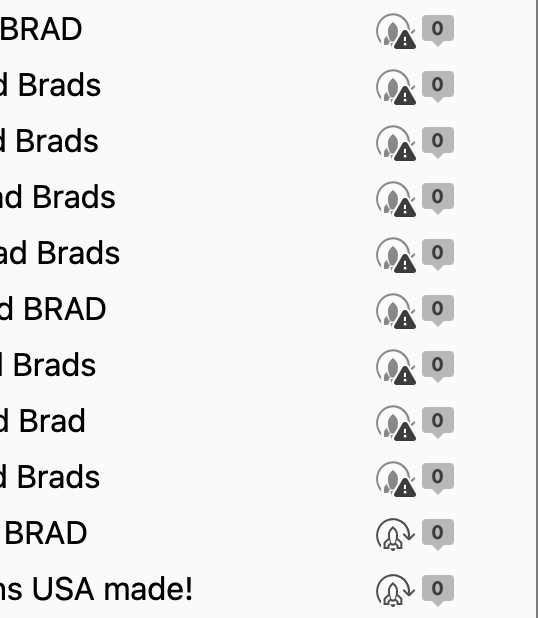
GS 10 is creating duplicate auctions and it has them marked with an exclamation mark. They have the exact same item number. I can’t throw them away because they are running auctions. It is a file of 37 listings. I am supposed to have 108 listings in auctions and that number agrees with the number currently running on ebay. GS has 145 listings in auctions. It is possible that syncing is doing this. Should I leave them alone, let them run and they end in 7 days and the problem goes away?
That exclamation mark refers to the “Automatic Restart” feature in the “Advanced” Inspector. These listing most likely couldn’t be automatically restarted.
Are you saying they all are running listing with the exact same eBay item number? You can open each of them in “Live” mode?
What you could try is to use GarageSale’s search field to find all listings with the same title. Only one of the should be the “running” one (listing icon has a blue or green border). If so, export the other ones (just in case) and then you could delete them (and empty the trash).
The only difference between the 2 are the tag color which I did after the fact to keep them separate. The exclamation mark is running and the one without is also running (as the screenshot shows). I have 37 pairs that are like this. Same two listings with one item number on ebay, which is correct, but GS has 2 running. I can open them in live mode. The sync feature is on both computers and they both have the exclamation mark running auctions. Neither can be separately deleted because the are both marked as live.
That’s ok if you don’t know why GS is doubling the auctions. They will end in 5 days. I will post next week if GS restarts again with the exclamation point marked auctions. The nice feature with GS 10 is in live mode focus is no longer lost after a second and I can once again use the up and down arrows to scroll.
Waiting until next week may not work. At the end of the auction both auctions, the ones marked with the exclamation mark and the legit ones, may both try and restart. What do you think Kristian?
Unfortunately, I have no need how it’s possible you have several identical copies of the same item. It’s worth a try to delete one of the twins and then check if you also lose the other one. (Only try it with one twin/pair for now. Also, you might want to export the listing first before actually deleting it.)
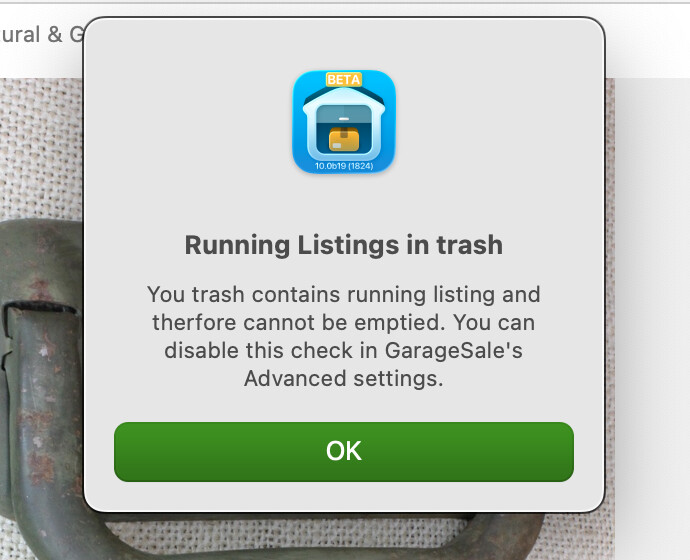
I get this note. So what I did was turn off the automatic restart feature on the 37 twins so those won’t restart and should go away once the 7 days is expired. This doesn’t have any effect on the twin without the exclamation mark.
Turning off the restart function on the twins kept them from restarting and replicating the twin malfunction. Hopefully GS doesn’t continue to create these exclamation marked listings into the future.