I have about 600 listings [according to the eBay website], that lack a value in Country of Origin. Is there a way I can search/filter for those listings in GS and selecting them, change a batch? [eg: for books from certain publishers, I can make the educated guess where the origin is so being able to select 100+ of those and change those and then send the revision to eBay would be awesome].
eBay’s website allows you to see what items you have that have a missing Country of Origin field, but you can not mass edit them. Likewise, they also allow you to filter on what listings they assigned a country of origin to [which I would assume, show up as empty in GS, since eBay assigned it when I listed the item].
Since “Country of Origin” is an item specific, there is no way to use the Bulk Find & Replace feature for that, unfortunately.
However, it should be possible to use a script to find all listings that have an empty “Country of Origin” item specific. All found listings could be displayed in a list so you could then edit them manually or maybe in bulk e.g. by using the Copying and Pasting Listing Components feature.
Do you think such a script that finds all listings with an empty “Country of Origin” attribute could be helpful? Please let me know.
At least in the US, the Country of Origin on eBay is a required field for all categories one can sell in. This is due to lovely tariffs. When the field is left blank, the item is not available to purchase by international buyers, hence my reason for wanting to find the 600 items in my inventory and fix that.
A script would be super useful, yes!
For more details on the issue, the YouTube channel, Justin Resells has a video from Monday Feb 23rd that explains it more.
Every listing on ebay.com [in the US] has to have the Country of Origin attribute. Customs Requirements | Seller Center Despite what the page says, the bulk edit tool only allows filtering on what listings lack the value for that attribute - you have to go into each listing from there to add the country of origin.
The big issue is that this may be outside the scope of GS. I have about 2,300 listings and for most, eBay assigned the country of origin when I listed the item via GS. I did not use the field in GS to put the value. When eBay could not determine it, it left it blank.
To be clear, country of origin is not “country where I am selling this product” but rather where the product was made. Most of my books are published in the US, though some are from the UK.
It seems to take time for eBay to assign the Country of Origin. I uploaded 3 cheap books via the scheduler today and none of them are assigned a country of origin yet, but ones I uploaded yesterday, eBay did assign that field to a value. For example, looking at eBay item 137066809607 [which yuck, the images look horrible, so I will be fixing that!], I did not have the country of origin as an attribute I could give a value to. And here I was going to include a screenshot of the 15 attributes in GS, but I accidentally clicked on the Product name field in the sidebar instead of Attributes, and that wiped the listing for me - it’s a feature I do not like The listing had 15 attributes, and now that I accidentally clicked on the product name, it has 20, and a new listing title, etc. For that book, several attributes were not accurate - eg: the title, the binding [it is a paperback] and more, so I had to edit and delete some attributes, but now the only copy of those is on eBay’s website, where they added some attributes I never submitted, like Country of Origin.
Anyway, finding listings where it is blank would be useful as well as having the option to fill in a value. The biggest issue is that one would need to pull in the Country of Origin field from eBay since it is not [currently] present in any of my GS listings. I did not realize eBay now requires that field to be used for every single item one sells on eBay if one wishes to sell internationally.
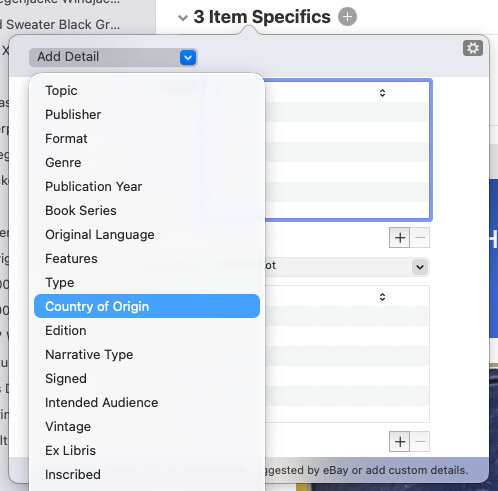
Country of Origin is an item specific provided by eBay. I just checked and was able to select it from the “Add Detail” button in the Attributes/Item Specifics popover.
In theory you could use the Apply Current Changes from eBay feature to import that specific Country of Origin attribute from your live listings.
However, doing that might not be necessary, because you could instead add the ‘Country of Origin’ attribute to your local listings in GarageSale and then upload the changes by using the revise function. This way you “overwrite” the Country of Origin value added by eBay.
I will see if I can create a script that adds the missing Country of Origin attribute to all selected listings and provides you with a list of the listings so you can further edit them.
Yeah, for me, I did not realize that it was required [for international sales], so I now need to add that attribute to all of my item templates [I have “templates” which are just empty listings for different kinds of items - CDs, nonfiction books, magazines, etc], and have it default to US [which is 90% of what my inventory was made in, so easier to change the value 10% of the time ]. That is fully on me for not realizing that was an attribute required by eBay for international sales. Going forward, I can revise my templates - going backward, any kind of script that allows me to add the missing value, or better yet, as you suggested, import what eBay has added, change if needed, save locally and revise as needed.
Let me try the apply current changes from eBay first before you write that script, as that would at least allow me to import what eBay has already assigned. Then maybe all I would need would be a script that would display listings that have that field blank [right now, in GS, 100% of my listings have that field blank, but if I can successfully import that field for the listings that eBay has assigned a value to it, that will at least get things started. Reviewing 2,300+ listings is not something I am looking forward to doing, but if I can do 100 a day then it’ll be done in no time.
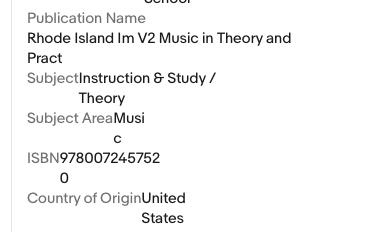
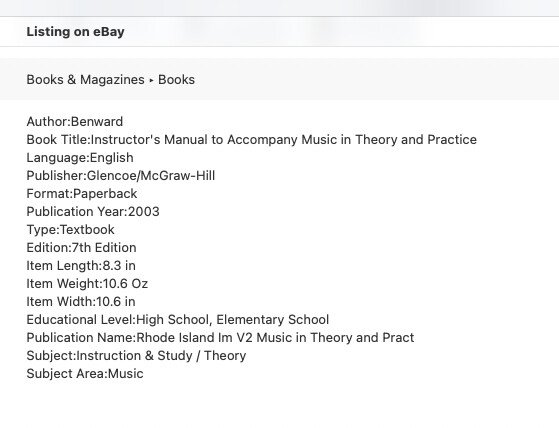
Our messages crossed - I will give this a try right now. Thank you! Am I correct in seeing that when using the “Apply Current Changes from eBay”, there is no way to select an individual attribute? It’s a bit weird as the Live listing view shows attributes that are not showing up in “Listing on eBay” - eg: the Country of Origin and even the ISBN10 and ISBN13 fields [or sometimes just ISBN].
I tested it on one listing - worked perfectly! Then I was able to find 3 listings that I could select in GS that also needed the field added, and it added it to all 3 perfectly. Revised the listings, and they all have country of origin now! Thank you!

 The listing had 15 attributes, and now that I accidentally clicked on the product name, it has 20, and a new listing title, etc. For that book, several attributes were not accurate - eg: the title, the binding [it is a paperback] and more, so I had to edit and delete some attributes, but now the only copy of those is on eBay’s website, where they added some attributes I never submitted, like Country of Origin.