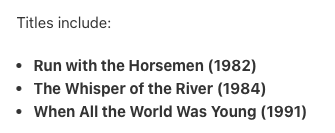
when I created it last night [but did not make it go live], it looked like that. But when I re-visited the listing to give it images and a price, the list looked just like the 2017 post above! I’ve noticed this happening in a lot of my listings and when I look on eBay, they show up like that too. I have to regenerate the list in a text editor and copy/paste back over to GS, as trying to type them results in missing bullets, once I’ve deleted the list. It is an odd behavior and I’ve seen it happen dozens of times now [for my book lots/bundles, I use the same formula as above - in a text editor - Drafts - I have the names of the titles listed in either alphabetical order or date order, and I copy that into GS. Highlight the list, hit command-B to bold it, and then click on the bulleted list icon. It always works. But then a few minutes or hours later, the list is corrupt like @heather reported so many years ago.
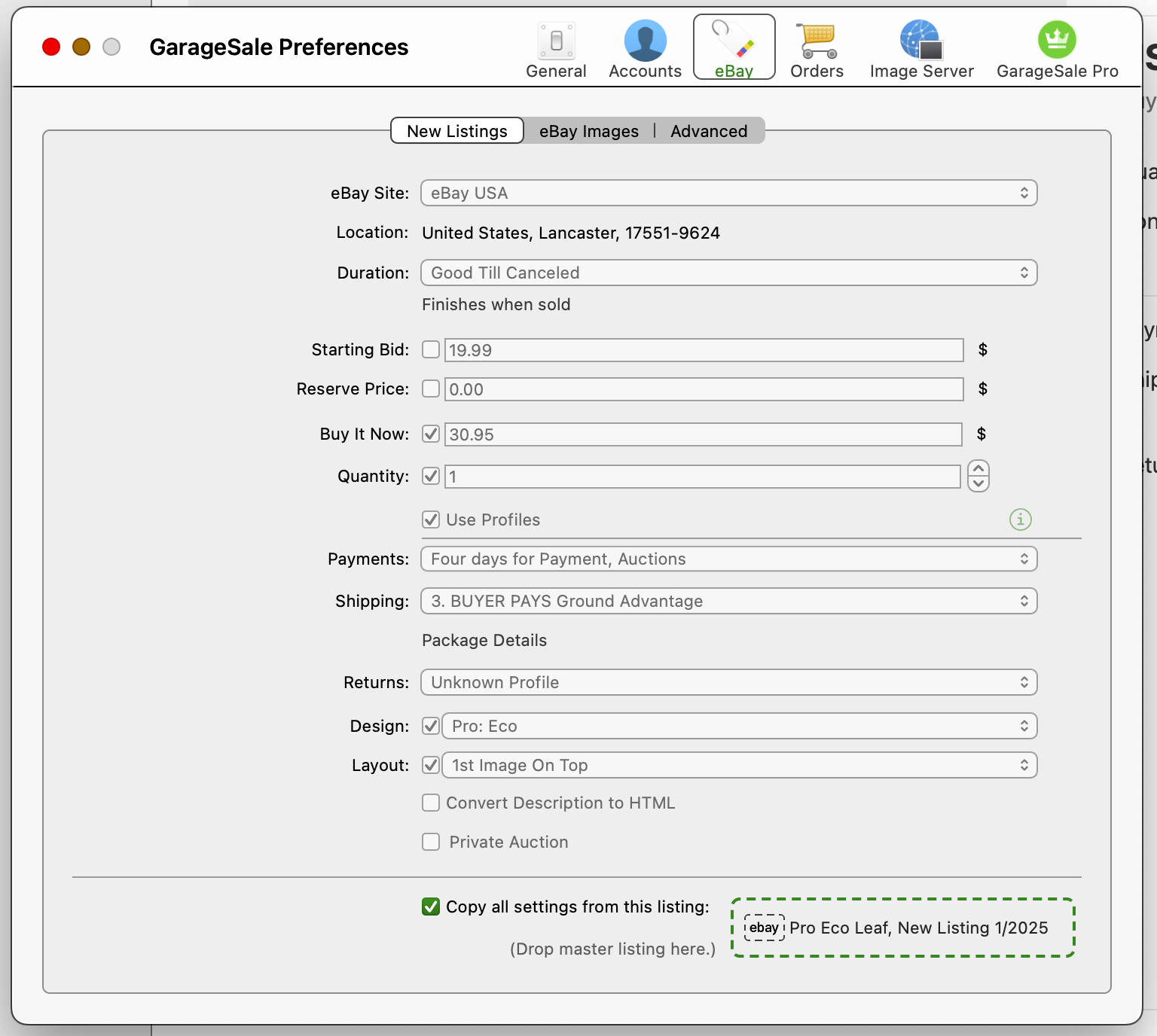
I run every listing as a bulleted list, over 1,000 currently on ebay and for 5 years. I haven’t seen this issue exactly. Line spacing between bullets can be an issue and was extreme when I switched to bulleted lists 5 years ago. I reported it and GS devs said it had to do with cutting and pasting from different sources, web pages, other listings, other programs, ect. There is formatting scraps I think they said that creep in and corrupt the formatting of the listings. What helps in the line spacing issue, which seems to me to be a related issue to yours, is start with a fresh new listing from the drop down menu bar NOT a duplicated one that can have formatting scrap code hidden in it that messes with your listing. Don’t do any cut and paste but type everything out long hand with no clip board use. Use that listing going forward as your master listing (choose it in you preferences list, bottom check box) going forward for a while and your issue may clear up. Try duplicating that new listing right away and see if it has the bullet issue. If not then duplicate it going forward and the new string of listings should stay clean as long as you don’t cut and paste text from all over the place. I use GROK to help with writing descriptions and there is stuff that comes in with cut and pasting that messes with type size and fonts. They jump way down to 15 from 24, partial sentences, italics disappearing, ect.
For me, I never use formatted text as my source. Everything is done in Drafts - which deals with straight text, no bold, italics, HTML formatting, etc. My templates are 100% clean as they have “replace this text” as actual text in the body of each listing. If I go into HTML mode in GS, I can see there’s no stray CSS/html - nothing but the “replace this text” which I select all to, then paste into. Pasting into that area is 100% unformatted plain text. I highlight my list, command-B it [to bold it], then, while it is still highlighted, I select the bulleted list icon from the toolbar. I should make a custom keyboard shortcut for that. 100% of the time, it results in exactly the correct format. It’s when time goes by - minutes, hours, the next day, that suddenly the list becomes as the 2017 post shows.
This happens when the listing is 99% finished. What is lacking is either just the price, or the price and photos. When I go back to the listing to add either, before do add either, is when I notice the list corruption.
GS runs 24/7 [as does my Mac], never gets Hidden or Minimized.
Unfortunately I don’t use just one “master” template but have an entire folder of templates based on the kind of item I am selling. Each template is the same, content wise - they all have that filler text string “replace…” and that’s it. The differences with each template have to do with the eBay and Store category, the attributes, the shipping and return polices, the condition, and the lot size. Each template is named by using the Listing Title field to name it, and each template contains no photos, and just that 3 word text. When I need to list something, I generate duplicates of the template, and compose all text in Drafts [since typing in GS is a hit or miss with the focus issues]. I will at times attempt to tweak a listing title after the fact [fighting with GS taking the focus away from the field], and if I notice an issue/typo in the listing description, then….sigh, it’s a process to try and select all and type “text here” or something, as select all [command-A] rarely works for the listing description field.
I should also say, I do copy/paste from my inventory app, but it too only deals with text fields - no markup of any kind is allowed. I use Drafts to format listings that have titles [to become bulleted lists], but for listings that are not lots / bundles, the text comes right out of my inventory app and gets pasted into GS. [the same text is pasted into the inventory app from Drafts when there are lists, as I use Drafts to auto-sort lists and to dictate stuff too; I do not use any LLMs for listing description due to multiple reasons which are OT for this thread ].

 It sounds like you should get clean text then.
 ].
].