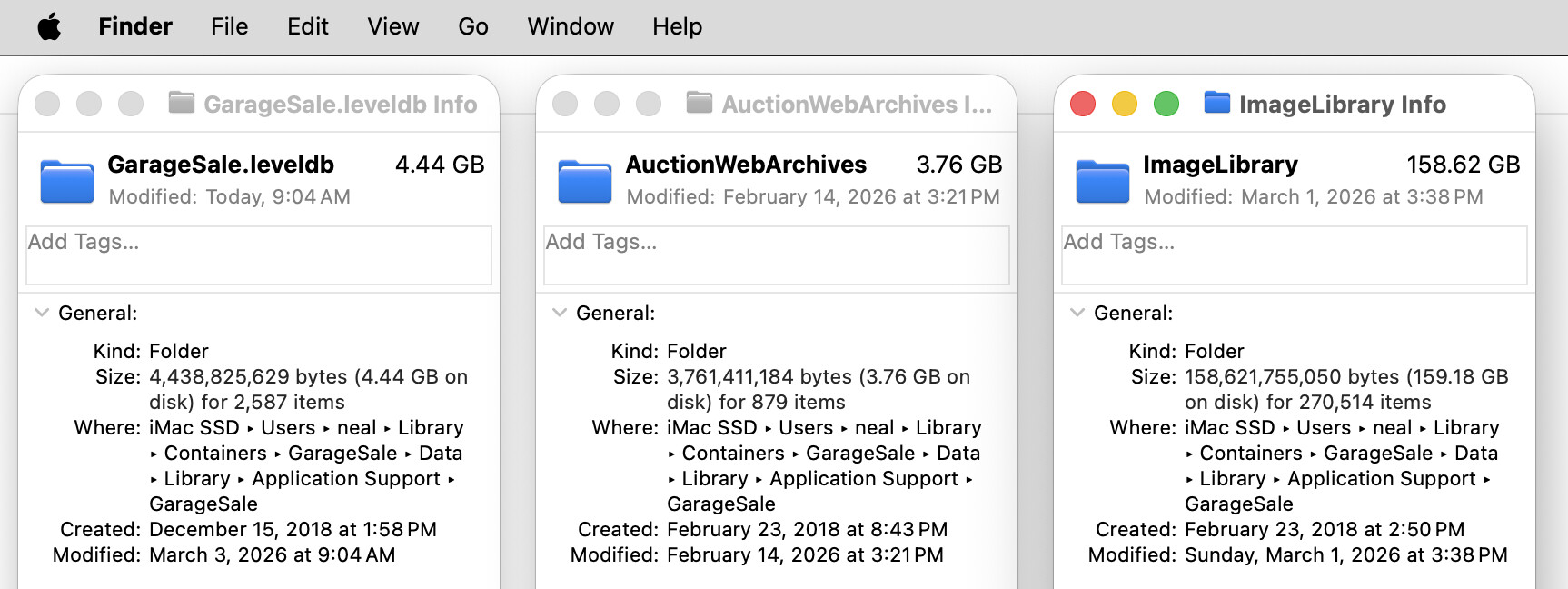
Here is what I have discovered triggers the spinning ball of death.
#1. Removing all but the first picture on ended listings fixes the spinning ball of death from happening at all on those ended listings.
#2. I removed 800 ended listings and pictures on 7,700 ended listings and saving 3 gb of GS library space. This had NO effect on 1,000 running listings and spinning ball of death. Still get 2-5 seconds hesitation and 2-3 seconds of spinning ball of death on them.
#3. Here is the fix to spinning ball of death problem drum roll…my pictures were all too big. Most pictures were 5-7 mb and with 10 picture minimum per listing. I have reset my camera to shoot M pictures at 3984 x 2656 dpi. I tried shooting at 1920 x 1280 dpi but it didn’t improve picture load time much more. I am using JPEGMiniPRO to reduce them even more down to 750mb to 1.2gb per picture. The pictures look exactly the same on ebay and GS and MORE importantly…. NO spinning ball of death!!!
Here is the rub though…. 1,000 listings with huge pictures and no way to reduce them. I shot them, dropped them into GS and threw them away. But they will slowly sell and over time be replaced with new listings with smaller pictures.
one picture is great… It is the size of the pictures. I was loading 5-6 mb pictures and 10 or more pictures per listing. I can still trigger the hesitation and spinning ball of death easily by clicking on any of the running 1,000 older listings. My new listings all have up to 12 pictures and they pop right open
I’m so glad the images were the thing as I figured they were. Mine average about 200kb each [9-30 images per listing]. I did do a mass JPEGmini Pro resize on the existing images long ago; I believe I just opened the GS Library up, and with GS quit, went into the ImageLibrary folder and ran JPEGmini Pro on all those files [making sure to have JPEGmini set to replace the file]. My ImageLibrary folder is only 30GB now.
I would double check with the devs, but back in 2021 I used JPEGmini to shrink all those images in that folder and it saved a lot of space and made GS feel snappier [I rarely got spinning beachballs though]. Just make sure GS is not running when you do this.
ooooh… that sounds risky! I batch reduced the pictures with the AppleScript to one picture in the ended listings so I wouldn’t risk ruining my database. I did a sample listing at 720 x 480 but the pictures were at 100-200kb before compressing
One thing you can do is sort the folder by date [or file size] and just do the files that are the oldest/largest. But yeah, I am sure one of the devs will chime in when the time zone is appropriate. Overwriting the files doesn’t affect the database though, as the file names stay the same [make sure you have that set in JPEGmini!].
I looked at my logs and I did it back in 2021 w/o talking to the devs. But fully get why you would want to make sure first! [my biggest hangup with GS is that text fields loose their focus 100s of times a day, making data entry and typing into them very, very frustrating- that and the “send to Endicia” feature always defaulting to Ground Advantage instead of what the order’s postal class is]. I doubt me reducing the image size has caused either of those issues.
292GB is quite insane!
I keep app my image dimensions to fit within a 1600x1600 square - but that can be decided before sending to JPEGmini. I always use JPEGmini as my last step. I know JPEGmini has the feature where it can also re-size images, but doing so requires one to export the images to another folder; so I do all my processing beforehand, and use the “optimize originals” [and turn off the warn before replacing files dialog box].
My detailed reply about how I process stuff is at:
EDIT: I should also state: I started using JPEGmini in 2021 [Pro version was for videos, non pro was $39 and just did images; now it is Pro and Pro Suite]. I did not start to resize images until the GS/macOS bug came up a while ago where previews in GS were blurry. While the files were going through JPEGmini Pro then, they were still at 3000x2000 or something similar, pixel wise. When I reduced them to fit within a 1600x1600 square, that’s when the blurry preview bug was fixed
I use much larger pictures and I do not see that problem, but more than three pictures is quite rare for me.
If I select 2000 new items for listing, the highlighting of them is almost immediate and the launch control window takes only a few seconds to appear. The actual listing of them is very fast.
However ,if Ii select 2000 items that were previously listed, it takes ages to highlight them and even longer for the Launch Control Window to appear. The actual listing is still very fast.
In the second case I have selected move original to Trash as a safeguard. That maybe part of the speed issue. I might try without that option.
However, in general, apart from the actual listing process, I would have though GS would mostly be using indexes to the listing.
I have observed that a large ‘trash’ will contribute to GS slowing down.
one picture is great… It is the size of the pictures. I was loading 5-6 mb pictures and 10 or more pictures per listing. I can still trigger the hesitation and spinning ball of death easily by clicking on any of the running 1,000 older listings. My new listings all have up to 12 pictures and they pop right open
This I think is due to GS taking priority while you are using GS. I wish GS could wait until off times or be delayed to do the updating of categories as well. GS seems to wait until I start using it to take over and run category updates and shows me a gear spinning for 1 minute.
This doesn’t seem to be the case for me. I’ll have a preview “template” open for several minutes, so it has already downloaded the info [this is a very, very slow process for me due to my ultra slow DSL connection, so for me one can not even see the preview screen until it is done doing this - even has a little countdown graphic].
The fields for item description and listing title are the main ones that won’t focus stick. And the item description often completely ignores the command A keyboard shortcut if I need to select the entire description to be replaced by an updated one. Other times it does work, and other times it works on the current paragraph only. I’ve been searching for consistency to be able to better report this to the devs, but other than “happening daily with every listing”, the focus issue for me shows no pattern, nor does the command A issue.
It’s in Preview mode. I don’t use Edit or Live mode [I mean, I use Edit mode once in a blue moon to create new templates]. I see the spinning gear while it gets new category info quite often. That’s not the issue for me. The issue is simply trying to click into the Listing Title or the Item Description to either type or paste text there; or edit existing text. It takes many clicks of the trackpad for the fields to keep focus; I can watch the bounding box change colors as it loses focus a second after the cursor blinked in the field, for example.
Catch a video of it for the devs to see what is going on. It does sound very annoying. I don’t get the same behavior on my machine so hopefully the fix doesn’t break GS for me. I got a similar terrible behavior on live mode and they said it was my old system or old Safari but chrome does it also
Question: I found the library folder… There are 43,500 pictures in there. Do you think I can highlight them in batches and use jpegmini to reduce them? Or does jpegmini do the whole folder
Yes. That’s what I did. Dragged groups of 1,000 at a time or something like that. This was years ago. But as long as you have JPEG mini Set to overwrite the original you’ll be fine. You can sort the list by date or size to help get the largest / oldest pics first
UPDATE I used jpegmini pro to compress the ImageLibrary. It removed a MASSIVE, MASSIVE 218.64 GB from 43,592 pictures and the ImageLibrary is now 74.6 GB. This had NO effect on 1,000 running listings and spinning ball of death. I still get 2-5 seconds hesitation and 2-3 seconds of spinning ball of death on them. SO it didn’t fix the spinning ball of death.
The elephant in the room is there is still 37,000 pictures 1mb up to 21.5mb each.
Here is my question…
991 active listings with worst case average of 15 max pictures in each =15,000 pictures
and 7722 sold listings with 1 picture each =7,722 pictures
That is a total of worst case number of pictures =22,700 pictures
Where are the extra 20,000 pictures count coming from? 43,592 pictures in the ImageLibrary.
Question for devs…Does GS never throw away deleted pictures? The oldest pictures were from 2013.
In the ImageLibrary. The rest of the 43,592 that are smaller than 1 mb, the size I figure will load without the spinning ball. I ran JPEGmini on all the 43,592 pictures. It more than reduced them by 50% but they are still 1mb up to 21.5mb each too big to load fast
What is the difference between a picture I shoot with 350 kb and one that I shoot at 1.5 mb that jpegmini reduces down to 350 mb? They look the same to my eye on GS and after uploading to ebay




 |
|